Static websites and articles
Dated articles, release notes, whitepapers and standalone landing pages share the normal HTML and PDF pipeline. Leading metadata fields declare when a page is eligible for publication, which layout it uses, and whether it also compiles to a standalone article PDF.
Authoring and publication state
The guidedog ssg commands create and transition articles in place:
guidedog ssg new notes.rst --title "Release notes"
guidedog ssg schedule notes.rst --at 2026-10-20T09:00:00Z
guidedog ssg status
guidedog build html --now=2026-10-20T09:00:00Z
Pass a .md path to create Markdown with YAML front matter instead of reStructuredText. For Markdown builds, include .md in source_suffix and enable myst_parser in extensions as usual. new creates a draft and refuses to overwrite an existing file. publish clears draft, schedule and expiration, retaining an existing past date or stamping the current UTC date when the source had none or a future date. draft withholds a source from subsequent release builds without discarding its existing date metadata. Version control stays in the author’s hands; the commands never commit, tag or move files.
An article declares its metadata in the leading field list (or YAML front matter block):
:date: 2026-10-16
:author: Ada Lovelace
:tags: rust, publishing
:summary: A short abstract.
:pdf: article

Release notes
=============

Article body.
Date-only publication starts at midnight UTC. publish-at overrides that boundary with an RFC 3339 instant, and expires-at ends publication at an exclusive instant. Drafts, future articles and expired articles are excluded before navigation, search, feeds and source downloads are built. Publication metadata is source configuration and is excluded from gettext catalogs. Recognized publication fields supply layout data and are omitted from body rendering and search text, while unknown fields and ordinary later field lists remain content. To vary metadata for a separate language edition, edit that edition’s source files. Invalid publication metadata stops the output commit and preserves the previous successful website.
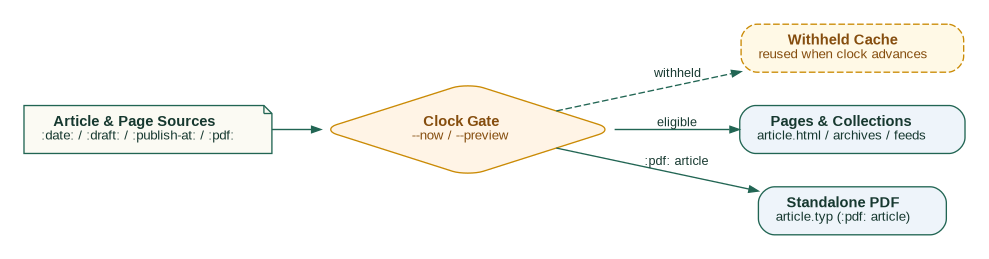
Use guidedog build html --preview (or guidedog serve --preview) to inspect unpublished pages locally. When keeping both public and preview outputs on disk, write the preview to a separate output directory:
guidedog build -b html . preview-output --preview
Collections, archives and feeds
Embed a chronological list of eligible articles in any page with .. postlist:::
.. postlist:: 10
   :path: notes/*
   :tags: rust
   :sort: -date
   :excerpts:
:path: matches docnames without a source suffix. Category, author and series filters match exactly, and every listed tag must match. Articles are ordered by publication instant (newest first by default), with docname breaking ties; :sort: date places the oldest first. :style: cards adds a card-layout CSS class, and :excerpts: includes each article’s introduction or plain-text summary.
Rich article introductions
We place one .. more:: boundary after the introduction to select a rich excerpt:
:date: 2026-10-17
:author: Ada
:summary: A plain description for metadata and feeds.

Our first observation
=====================

We introduce the result with **emphasis**, `a reference <https://example.org>`_, and a list.

* The first observation.
* The second observation.

.. image:: images/observation.svg
   :alt: Our observation

.. more::

We explain the complete result here.
The introduction retains paragraphs, inline markup, links, lists, images and other ordinary document nodes.
Both postlist with :excerpts: and generated collection or taxonomy pages render it during the build.
The full article retains everything on both sides of the boundary in HTML and PDF.
The boundary emits no visible content.
Drafts, scheduled articles and expired articles follow the same publication gate as other listings.
We put the boundary at document level, before any subsection, outside lists and other directives.
It accepts no argument, option or body.
A second boundary or a nested boundary produces a diagnostic.
Literal .. more:: text inside a code example remains literal text.
An empty introduction is allowed.
Toctrees, postlists and todolists inside an introduction are omitted from its excerpt to prevent recursive listings.
Without a boundary, the excerpt is the escaped plain-text :summary: in a paragraph, or empty when no summary is given.
We keep :summary: independent of the rich introduction: feeds and description metadata continue to use that plain text.
For a Tinkerer migration, we can retain .. more:: and replace site-specific browser code with native postlist directives or collection templates.
No runtime plugin or browser fetch is required.
A collection template can render the selected introduction directly:
{% for post in collection.posts %}
<article>
  <h2><a href="{{ post.url }}">{{ post.title }}</a></h2>
  {{ post.excerpt_html }}
</article>
{% endfor %}
post.excerpt_html is rendered HTML marked safe for the template engine.
It follows the build’s content policy, including restrictions on raw markup and unsafe URLs.
Links, images and downloads are relative to the destination listing, including nested archives and pagination pages.
Each listing occurrence has its own anchor namespace.
Local references to included targets stay within the excerpt; references to targets or footnotes after the boundary link to the full article.
We render a post’s excerpt once per template occurrence; repeating the same post.excerpt_html value in a template also repeats its HTML IDs.
Enable site-wide discovery files in conf.toml:
[site]
base_url = "https://example.org/project"
sitemap = true
feeds = true
The HTML and dirhtml builders emit sitemap.xml, rss.xml and atom.xml using the configured base_url (including any hosting prefix). Discovery files derive their timestamps from source metadata rather than the wall clock, producing identical bytes when eligible sources and metadata are unchanged.
Generate taxonomy archives and paginated collections from the same [site] table:
[site]
base_url = "https://example.org/project"
sitemap = true
taxonomies = ["tags", "category", "year", "authors", "series"]
page_size = 10

[[site.collections]]
output = "journal"
title = "Journal"
tags = ["rust"]
page_size = 5
feeds = true
The collection starts at journal/index.html and continues at journal/page/2/index.html with relative previous and next links. A zero page_size keeps the collection on a single page. Each collection accepts path, category, tags, author, series and year filters. When feeds = true, journal/rss.xml and journal/atom.xml contain the complete filtered selection across all pages. The collection layout defaults to collection.html unless template names an override. Templates receive the current page number, page count and selected posts in collection, with collection.previous_url and collection.next_url set to relative URLs or None. Each post entry provides title, docname, date, url, summary, excerpt_html and typed meta values, including its optional pdf_url.
Taxonomy archives are written at paths such as tags/rust/index.html and year/2026/index.html. Headings preserve the original label text while filesystem paths escape uppercase, punctuation and non-ASCII bytes so distinct labels never collide on case-insensitive filesystems. Generated pages never overwrite an author-written page or another generated output. When publication state or collection membership shrinks, the output commit removes obsolete archive and pagination pages automatically.
Layouts and standalone article PDFs
Dated articles select article.html by default; other pages select page.html, which extends layout.html. Any page can choose a custom template in templates_path with :template: landing.html, and :nosidebar: true hides the built-in navigation sidebar. Templates receive dates, authors, tags, category, series, summary, draft state and PDF links in page.meta. Article templates also receive page.older and page.newer in publication order, page.taxonomies mapping each enabled taxonomy to {name, url} entries, and page.word_count and page.reading_minutes (computed using myst_words_per_minute, counting CJK characters individually).
Setting :pdf: article compiles a standalone PDF next to the article’s HTML page (notes.pdf for html, notes/index.pdf for dirhtml). The built-in article.typ layout renders continuous prose with a title and author block, abstract, and running headers after page one. Override it by placing _templates/article.typ in the project with the same book function signature. The generated Typst source is saved under sources/ in the output folder for inspection. Standalone article PDFs are produced by the html and dirhtml builders; singlehtml retains its single-page HTML behavior.
Starter sites
Initialize a complete starter project with one of three presets:
guidedog ssg init project --preset project --title "Our project"
guidedog ssg init journal --preset journal --title "Our journal"
guidedog ssg init research --preset research --title "Our papers"
guidedog ssg build journal
projectstarts with a custom landing page and a documentation guide.journalstarts with a dated article, chronological cards, feeds and taxonomy archives.researchstarts with a paper containing an abstract and mathematics, and builds its standalone PDF.
All three presets copy editable HTML, CSS and Typst theme files and refuse to overwrite an existing destination. Update the example base_url in conf.toml before publishing feeds or sitemaps.
When no mounts are configured, guidedog ssg build builds the single project into _build/site by default. --out DIR selects another destination, --now RFC3339 fixes the publication clock, and --preview includes withheld documents.
Mounted projects and editions
Assemble multiple Guidedog projects and language editions into one website from a root conf.toml:
project = "Our website"

[site]
base_url = "https://example.org/project"

[[site.mounts]]
name = "home"
source = "pages"
output = ""

[[site.mounts]]
name = "manual"
source = "manual"
output = "manual"
builder = "html"
overrides = ['html_extra_path=[]']
editions = [
  {language = "en", output = ""},
  {language = "de", output = "de"},
  {language = "ja", output = "ja", source = "manual-ja"},
]

[[site.assets]]
source = "shared"
output = "assets"
Every mount source must resolve beneath the site configuration’s directory after following symbolic links. An edition uses gettext catalogs in the mount’s source project unless source names a separate translated project directory. Edition output is relative to the mount’s output prefix; an empty string mounts at the root of that prefix. Mount names and edition output directories must be distinct ignoring ASCII case, though different mounts may share an output directory when their emitted files are disjoint.

Supported mount builders are html, dirhtml, pdf and discussion-pdf (which validates a discussion catalog under prefix and builds a PDF book for each active record). exclude filters a mount’s relative output files with globs, and overrides passes -D setting assignments (with {language}, {edition}, {site_root} and {base_url} placeholders). Select languages through editions.language rather than a language override so routing and translated output stay aligned. Nonempty version and release values from the root configuration propagate to every mount, and one publication clock governs the entire build.
Link across mounts with the mount:// scheme:
`The manual <mount://manual/index.html>`_
The link resolves to the target mount’s matching language edition, falling back to its default edition. HTML receives a relative URL (preserving any hosting prefix), while PDFs use the public base_url. Assembly verifies that every mount:// target exists in the current generation, so a stale file from an earlier build cannot satisfy a link to a newly withheld document. If any mount fails or a cross-mount target is missing, the previous published website remains intact.
The editions are built at the same time, each in a child process, as many at once as fit in nine tenths of the memory available (GDS 0020). An edition weighs what it used at its last build, with a quarter more, and an edition heavier than that capacity is built alone. The site and the order of the reports are those of a build of one edition after another, which --jobs=1 asks for. Two builds never write one output folder at once: each holds a lock on its records folder, and a second one stops with build.busy.
Pass --no-pdf to skip PDF mounts during an HTML preview and strip cross-mount PDF download links; custom templates can inspect ssg_no_pdf to hide PDF controls. Guidedog’s own docs/conf.toml declares the landing pages, seven manual HTML editions, seven manual PDF books and discussion catalog builds in this format, and cargo xtask build-site delegates directly to guidedog ssg build.
Pinned themes
Package a directory containing _templates/ and _static/ into a portable .gdt archive and install it with an explicit SHA-256 pin:
guidedog ssg theme pack theme-source --out theme.gdt
sha256sum theme.gdt
guidedog ssg theme install https://example.org/theme.gdt --sha256 HASH --project journal
guidedog ssg theme verify journal
Replace HASH with the archive’s SHA-256 digest. Enable the verified theme by setting theme = true in [site]. Project _templates/ files take precedence over the installed theme, and project static files override theme static files of the same relative path.
A version-one .gdt archive is UTF-8 JSON (format = 1) mapping portable relative paths beneath _templates/ and _static/ to base64 file bytes. Archives are bounded to 4,096 files, 64 MiB of expanded data, and 32 directory levels; traversal, case aliases, reserved platform names, symlinks, file/directory overlaps and executable hooks are rejected.
guidedog-theme.lock records the source URL or path, the archive SHA-256 and the canonical tree SHA-256 (computed over a versioned domain tag and length-delimited sorted filenames and file bytes). Installation writes and syncs _themes/<TREE_SHA256>/ and verifies both the directory and the encoded lock before atomically replacing guidedog-theme.lock. Builds never fetch themes over the network; they verify the locked tree offline and fail closed if any file is missing, modified, added or replaced by a symlink.