Move a Sphinx project to Guidedog
Guidedog follows Sphinx closely. It uses the same directory structure and understands standard reStructuredText and MyST Markdown markup. It recognizes the same configuration setting names and provides Sphinx’s Jinja template variables.
One difference shapes the whole move. Sphinx runs arbitrary
Python code in conf.py and needs a Python virtual environment with external packages.
Guidedog is a single compiled program that reads plain data
from conf.toml. It does not run Python.
So moving a project means separating configuration data from Python code.
Migration workflow
The move goes through these steps:
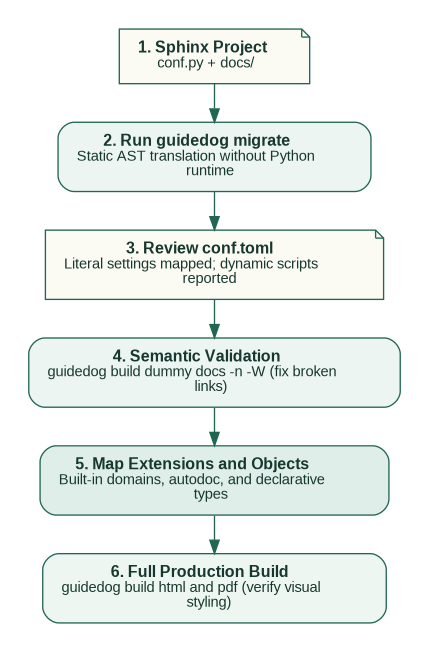
Step 1: Automated configuration migration
Guidedog has a migration tool that parses our existing conf.py:
guidedog migrate path/to/conf.py
What guidedog migrate does:
- It extracts literal configuration values (strings, numbers, booleans, lists, and tables)
and converts them to standard TOML syntax in
conf.toml. - It detects standard Sphinx settings (such as
project,author,extensions,templates_path,html_theme,intersphinx_mapping, andhtml_context) and maps them. - It finds computed expressions (such as Python calls like
version = get_version()orgit_revision = subprocess.check_output(...)). Guidedog does not run Python, so its migration report flags these values. We then give fixed values for them inconf.toml.
We review the generated conf.toml and replace each flagged expression with a fixed value.
Step 2: The three-pass verification strategy
Once conf.toml exists, we work through the migration in three passes:
Pass 1: Verify the document graph
We check that Guidedog finds all documents and builds the expected hierarchy:
-
Verify that
root_docnames our main entry point (usuallyindexorcontents). -
Confirm that
source_suffixlists every extension we use (for example,[".rst", ".md"]). -
Check that
exclude_patternsexcludes build folders, virtual environments, and temporary files. -
Run a quick semantic check using the dummy builder:
guidedog build dummy path/to/docs -n -W
The dummy builder checks every document and link without writing HTML files. We fix each warning about a missing document or a malformed include.
Pass 2: Verify references, domains, and custom objects
Next, we verify that cross-references and domain directives resolve:
- Standard domains: Guidedog supports the standard Python, C, C++, and JavaScript
domains, with their roles such as
:py:func:,:c:type:, and:cpp:class:. It addsodinandrustdomains of its own (see Domains). - Intersphinx links: If our Sphinx project linked to external documentation through Intersphinx,
we keep our
[intersphinx_mapping]inconf.toml. Guidedog fetches and parses standardobjects.invfiles itself. - Declarative custom object types: In Sphinx, projects often wrote small Python extensions
that call
app.add_object_type()to create custom directives and roles (such as.. confval::or.. setting::). In Guidedog, we declare these inconf.tomlunder[[object_types]], without code. See Declaring object types.
Pass 3: Verify presentation and templates
Finally, we check how the output looks:
-
HTML website: Run
guidedog build html path/to/docs -Wand inspect the generated pages. -
Jinja templates: Guidedog’s native Jinja engine supports block inheritance:
{% extends "!layout.html" %} {% block extrahead %} <link rel="stylesheet" href="{{ pathto('_static/custom.css', 1) }}"> {% endblock %} -
PDF books: Build a PDF book with
guidedog build pdf path/to/docs -W. Guidedog typesets the book with Typst and_templates/book.typ. It gives vector math, proper hyphenation, and running headers without a LaTeX installation.
Configuration settings mapping
Common Sphinx conf.py variables correspond to Guidedog’s conf.toml like this:
| Sphinx (conf.py) | Guidedog (conf.toml) | Notes |
|---|---|---|
project = 'Manual' |
project = "Manual" |
Standard string setting. |
version = '1.0' |
version = "1.0" |
Documented version number. |
extensions = [...] |
extensions = [...] |
Built-in extensions (graphviz, mathjax, intersphinx, myst_parser). |
source_suffix = ['.rst', '.md'] |
source_suffix = [".rst", ".md"] |
Supported source formats. |
root_doc = 'index' |
root_doc = "index" |
Entry document name (without extension). |
html_static_path = ['_static'] |
html_static_path = ["_static"] |
Custom styles and script folders. |
templates_path = ['_templates'] |
templates_path = ["_templates"] |
Jinja template directory. |
html_context = {...} |
[html_context] |
Passed directly to Jinja templates. |
Handling custom Python extensions
Some Sphinx projects rely on large Python extensions that inspect Python ASTs or modify Sphinx’s internal classes. For those, we have three options:
- Declarative object types: If the extension only created custom directives or roles,
we replace it with
[[object_types]]inconf.toml. - Build plugins: If the extension transformed source text, added custom HTML
wrappers, or generated static assets, we write a build plugin in Rust with the
gd-pluginscrate’s typed interface described in Write a plugin. The same plugin runs as an installed program (guidedog plugin register) or linked into our ownguidedogbinary throughgd_cli::run_with. - Static API extraction: Guidedog already reads Python docstrings, Odin declarations, and Rust doc comments without running the documented code. Use Document a codebase. Runtime-generated objects may need explicit RST descriptions.
Compatibility with Sphinx gives the evidence for Sphinx compatibility and the limits that remain.