Source pages, source links and class diagrams
Five of Sphinx’s built-in extensions connect a manual to the code it describes and to the build that makes it. viewcode writes a highlighted copy of each documented module and links it with the descriptions. linkcode links each description to its source on the web. inheritance_diagram draws class graphs. duration reports which documents are slow to read. imgconverter makes sure every image reaches the book.
We turn them on as in Sphinx, by name:
extensions = [
    "sphinx.ext.autodoc",
    "sphinx.ext.viewcode",
    "sphinx.ext.inheritance_diagram",
]
autodoc_source_paths = ["../src"]
The first three read Python source with the same scan that autodoc uses (Documenting Python with autodoc). Nothing is imported, and no program runs. The scan finds a module below autodoc_source_paths, its classes and functions, their bases, and the lines each one spans. A description written by hand with py:class or py:function is found as well as one that autodoc wrote, as long as its module is below those folders.
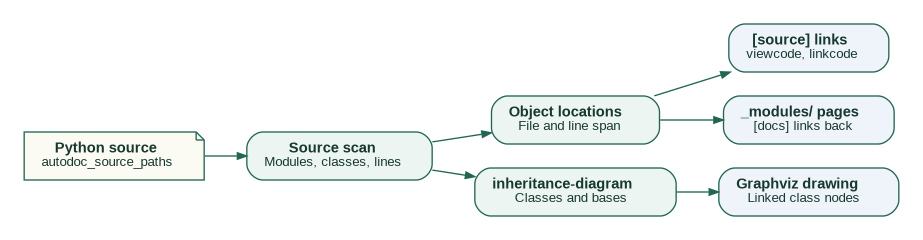
Every Python file the scan reads is a dependency of the document that needed it. When we edit a module, the documents that describe it are read again, and their links, source pages and diagrams follow the edit.
Source pages: viewcode
With sphinx.ext.viewcode listed, each Python description gets a [source] link after its signature. The link leads to a page that shows the module’s source, highlighted like any code block. On that page each described class and function sits in a block with a [docs] link back to its description.
For this module, src/shapes.py:
class Square(Shape):
    """A square."""

    def area(self):
        """The area."""
        return self.side * self.side
the description of shapes.Square links to _modules/shapes.html#Square, and the source page links back to index.html#shapes.Square. A page for each module lies in _modules/<package>/<module>.html, and _modules/index.html lists them all, a package’s modules nested inside it. The links are relative, so they work under dirhtml and when we open the files straight from the disk.
A class that a package re-exports is linked to the module that defines it. If Square were defined in shapes/square.py and imported by shapes/__init__.py, the description of shapes.Square would link to _modules/shapes/square.html#Square. A block starts at the definition’s first decorator and ends at its last line, so a decorated method shows its decorators.
The settings have Sphinx’s names and defaults:
viewcode_follow_imported_members-
true(default): link a re-exported object to the module that defines it.false: link only objects that the named module defines itself. The old nameviewcode_importis read as this setting. viewcode_line_numbers-
false(default).truenumbers the lines of the source pages. viewcode_enable_epub-
Accepted and unused, since Guidedog has no EPUB builder.
Source pages exist in html and dirhtml only, as in Sphinx. singlehtml, the PDF and text have neither the links nor the pages: a book does not need a second copy of the code.
A description whose module is not below autodoc_source_paths gets no link. The note viewcode.source names the module once per document, with the hint to add its folder. A module file larger than 8 MiB, the limit of every source read, gets no page, with the warning viewcode.limit.
Source links on the web: linkcode
Sphinx’s linkcode calls a Python function, linkcode_resolve, to make each link. Guidedog never runs Python, so it takes a URL template instead:
extensions = ["sphinx.ext.autodoc", "sphinx.ext.linkcode"]
linkcode_url = "https://github.com/acme/shapes/blob/{branch}/{path}#L{line}-L{end_line}"
In a repository whose checked-out branch is main, the description of Square.area above then links to https://github.com/acme/shapes/blob/main/src/shapes.py#L4-L6. These placeholders are filled for each object:
| Placeholder | Value |
|---|---|
{domain} |
The object’s domain: py, c, cpp, js, rust, odin. |
{module} |
The module as the description names it, or the Rust or Odin crate or package path. |
{fullname} |
The object’s name within its module, such as Square.area. |
{path} |
The object’s source file, relative to linkcode_root, with / between folders. |
{line} |
The first line of the definition, counted from 1. A decorator’s line counts. |
{end_line} |
The last line of the definition. |
{branch} |
linkcode_branch, or the branch read from the repository. |
{{ and }} |
A literal brace. |
linkcode_root names the folder {path} is relative to, relative to the source folder. Left empty, it is the nearest folder at or above the source folder that holds .git. linkcode_branch is the text of {branch}. Left empty, it is the branch that the repository has checked out, read from .git/HEAD, or the commit when HEAD is detached.
A link is added only when every placeholder the template uses has a value. A Python object that the scan found has them all. A c: or cpp: object, and the objects of the Rust and Odin domains, carry their names but no file. Only a template that uses nothing but {domain}, {module}, {fullname} and {branch} links them, for example a template that points at an API search.
The links appear in HTML builders, singlehtml included, after the signature and before the permalink. The PDF and text add nothing. With both viewcode and linkcode listed, a description gets both links.
Mistakes in the template are found when conf.toml loads. An unknown placeholder or an unclosed brace is refused, and listing the extension without linkcode_url is the warning config.ext.linkcode. A build that needs {branch} but has no branch and no repository warns linkcode.branch once and adds no links. An object whose file lies outside linkcode_root gets no link, with the note linkcode.outside.
guidedog migrate cannot read a linkcode_resolve function as data. It reports migrate.linkcode with a template to write in its place.
Class diagrams: inheritance_diagram
The inheritance-diagram directive draws the classes it names, a module’s classes when it names a module, and their bases up to the roots:
.. inheritance-diagram:: shapes.square
   :caption: The shapes and what they inherit.
The names are found as Sphinx finds them: relative to the current module first (py:currentmodule), then as written. The bases are read from the class statements and resolved across the scanned modules. Python’s builtins, such as object and Exception, are not drawn. A base from a package outside the source folders is drawn with its full name and nothing above it.
The directive takes Sphinx’s options:
:parts: N-
Show only the last
Nparts of each dotted name; a negativeNdrops the first-Nparts instead.0(default) shows the full name. :private-bases:-
Draw classes whose names start with
_as well. :top-classes: a.B, a.C-
Stop at these classes: their own bases are not drawn.
:include-subclasses:-
Draw the classes that derive from the named ones too. The scan looks for them in the packages of the named classes.
:caption: text-
Put the drawing in a figure with this caption.
The settings inheritance_graph_attrs, inheritance_node_attrs and inheritance_edge_attrs add Graphviz attributes to the graph, its nodes and its edges, and inheritance_alias shows a full class name as another name:
[inheritance_graph_attrs]
rankdir = "TB"

[inheritance_alias]
"shapes.square.Square" = "Square"
The graph is written as Sphinx writes it and drawn by the linked Graphviz, like a graphviz directive, so no dot program is needed. In HTML the drawing is an SVG asset with the graphviz-adaptive colors (embedded with <object> when nodes carry links, or <img> otherwise), and each node links to its class’s description when the project has one. A class without a description is drawn without a link. The PDF embeds a separate unlinked light SVG. Text shows the classes as a list, each with its bases.
A name that is neither a class nor a module in the scan is reported as inheritance.class and left out. A diagram may hold at most 1,000 classes; a larger one is inheritance.limit and is not drawn. Loading conf.toml refuses an attribute name that is not a Graphviz identifier, and a value that is not a plain word, number or quoted string is quoted, so an attribute cannot change the rest of the graph.
Reading times: duration
With sphinx.ext.duration listed, the build summary shows how long reading took, and which documents took longest:
guidedog building html for Shapes
  read     12 document(s) parsed, 0 unchanged
  write    15 output(s) written, 0 unchanged
  duration 0.214 s reading 12 document(s)
  slowest  0.081 s api/shapes
  slowest  0.032 s tutorial
Each time is measured with a monotonic clock around one document’s read. A document taken unchanged from the previous build took no time and is not listed. The output folder also receives sphinx-reading-durations.json, an object from document names to seconds.
duration_print_total-
true(default): show the total reading time. duration_print_slowest-
true(default): show the slowest documents. duration_n_slowest-
How many slowest documents to show:
5by default,0for all. duration_write_json-
The JSON file’s name in the output folder; empty writes none. A name that leaves the output folder is refused.
duration_limit-
Seconds a document may take; a slower one is the warning
duration.limit. Unset, there is no limit.
The times are evidence about one build on one machine. They differ from run to run.
Images for the book: imgconverter
Sphinx’s imgconverter runs ImageMagick to turn images LaTeX cannot use, such as GIF and SVG, into ones it can. Guidedog’s PDF is typeset by Typst, which reads PNG, JPEG, GIF, SVG, WebP and PDF images directly, so there is nothing to convert. The extension is accepted, and no program is ever started. image_converter and image_converter_args are accepted and have no effect.
An image in a format the book cannot show, such as TIFF or BMP, is reported as imgconverter.format, and the book shows its alternative text in its place. The hint suggests a PNG, JPEG, GIF or SVG version. When we name the image picture.*, each output picks the first version it reads. Pages prefer SVG, PNG, GIF, WebP and then JPEG; the book prefers SVG, PNG, JPEG and then GIF. So a project can keep a WebP picture for pages beside a JPEG copy for the book.
Diagnostics
Every message has a code, the location, an explanation and a hint. suppress_warnings silences them by their prefix, such as viewcode or inheritance.
| Code | Meaning |
|---|---|
viewcode.source |
A documented module is not below autodoc_source_paths; its objects have no [source] link. |
viewcode.limit |
A module’s file is too large or cannot be read; it has no source page. |
config.ext.linkcode |
linkcode is listed without linkcode_url. |
linkcode.branch |
The template uses {branch}, and no branch is set or found. |
linkcode.outside |
An object’s file lies outside linkcode_root. |
inheritance.class |
A name in an inheritance-diagram is neither a class nor a module of the scan. |
inheritance.limit |
A diagram would hold more than 1,000 classes. |
duration.limit |
A document took longer to read than duration_limit. |
imgconverter.format |
The book cannot show an image’s format. |
GDS 0011 records the design of these extensions and of the four others that read Python source.