Deliver format-specific content and custom directives
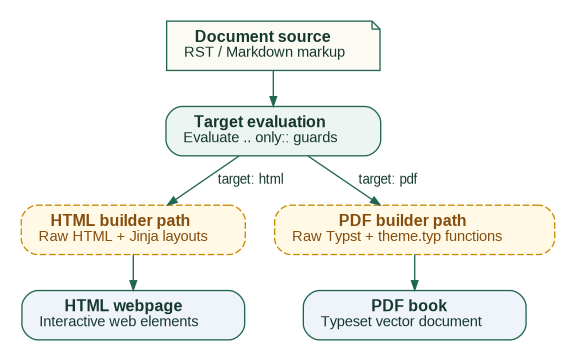
A single source tree can publish rich, dynamic HTML pages on the web while typesetting elegant, print-quality PDF books. This guide covers how to route content to specific output formats, declare custom domain directives, and invoke Typst typesetting functions.
1. Embed dynamic HTML and client scripts
Use .. only:: html paired with a .. raw:: html block to inject web-specific markup, interactive
calculators, or embedded audio/video components:
.. only:: html

   .. raw:: html

      <div class="interactive-panel">
        <button class="btn-refresh" onclick="checkHealth()">Check Health</button>
        <span id="health-status">Ready</span>
      </div>
To supply the supporting CSS and JavaScript:
- Place our script and stylesheet in
_static/(e.g._static/interactive.jsand_static/interactive.css). - Register them in
conf.toml:
html_css_files = ["interactive.css"]
html_js_files = ["interactive.js"]
The HTML builder copies these files into the build directory and injects <link> and <script> tags
into every generated page.
For this self-contained example, write _static/interactive.js as follows:
function checkHealth() {
  document.getElementById("health-status").textContent = "Healthy";
}
This changes a local status label. A live health check needs an application endpoint and request handling. We can leave _static/interactive.css empty until we add custom styles.
2. Typeset custom Typst formatting for PDF
To introduce vector shapes, tailored callout boxes, or custom typography for printed pages, wrap the markup
in .. only:: pdf:
.. only:: pdf

   .. raw:: typst

      #rect(
        fill: rgb("#edf5f2"),
        stroke: (left: 3pt + rgb("#216553")),
        inset: (x: 10pt, y: 8pt),
        radius: (right: 3pt),
        width: 100%
      )[
        #text(weight: "bold", fill: rgb("#216553"))[Security Advisory] \
        Always verify token checksums before deploying cryptographic credentials.
      ]
Guidedog emits this block directly into the Typst document before invoking the Typst compiler. The HTML builder automatically omits this block without emitting warnings.
The only directive controls output after parsing. Both branches must contain valid RST, and custom directives must be declared even in a branch omitted from the selected output. typst is not a built-in only tag; the raw block’s format name and the output guard serve different purposes.
Raw Typst executes only when the raw-content rule allows it (raw_content in conf.toml). --untrusted omits raw content and disables build plugins; it therefore cannot run these formatting and preprocessing examples.
3. Declare custom domain directives in conf.toml
When we need structured blocks with signatures, cross-references and index entries, we declare them under [[object_types]] in conf.toml. These declarations describe objects; they do not execute custom rendering code.
[[object_types]]
directive = "service"
role = "service"
index = "pair: %s; infrastructure service"
name = "first-word"
display = "Service: %s"
Now authors can describe services across all documents:
.. service:: auth-proxy (port 8443)

   Terminates mutual TLS connections and validates client bearer tokens.
Other documents can link directly to this service using the declared role:
Requests pass through :service:`auth-proxy` before reaching backend nodes.
In HTML, Guidedog produces semantic definition tags (<dl class="service">) with automatic anchor links.
In PDF, Guidedog typesets a styled description entry and records an index entry in the book’s index.
4. Alias existing directives
We can give Sphinx domain directives alternative names in [directive_aliases]. Targets may name their domain explicitly, or resolve in the standard or current domain. Core RST directives such as admonition are outside this alias mechanism.
[directive_aliases]
endpoint = "py:function"
.. endpoint:: check_health() uses the syntax and options of py:function. We can link to it with :py:func:`check_health`. For callouts, we use .. admonition:: Title directly.
5. Call reusable Typst functions from templates
Instead of writing verbose Typst code inline across multiple documents, define a reusable function in
_templates/theme.typ:
#let danger-box(body) = block(
  fill: rgb("#fde8e8"),
  stroke: 0.5pt + rgb("#9b1c1c"),
  inset: 10pt,
  radius: 4pt,
  width: 100%
)[
  #text(weight: "bold", fill: rgb("#9b1c1c"))[CAUTION] \
  #v(2pt)
  #body
]
Call it concisely from reStructuredText:
.. only:: pdf

   .. raw:: typst

      #import "/_templates/theme.typ": danger-box
      #danger-box[Rotating keys immediately invalidates active sessions.]
Import the function explicitly: the book template’s own imports are scoped to its module and do not expose helpers to document content. For many call sites, place this import in a project preamble selected by pdf_preamble.
6. Advanced: Preprocessing directives with a build plugin
For computed source content, we implement gd_plugins::BuildPlugin in Rust. This small example expands an exact, unindented .. chart:: latency line in RST documents. It leaves indented code examples and other source formats unchanged; it is not a general directive parser.
The plugin implements process_source, intercepting the raw document text before parsing:
use std::borrow::Cow;
use gd_plugins::{BuildPlugin, Hooks, PluginInfo, Problem, SourceFormat, SourceInput};

#[derive(Clone, Default)]
pub struct ChartPlugin;

impl BuildPlugin for ChartPlugin {
    fn info(&self) -> PluginInfo {
        PluginInfo::new("chart", "Chart", "1.0.0", Hooks { source: true, ..Hooks::NONE })
    }

    fn process_source<'a>(
        &mut self,
        input: &SourceInput<'a>,
    ) -> Result<Cow<'a, str>, Problem> {
        if input.format != SourceFormat::Rst
            || !input.text.lines().any(|line| line == ".. chart:: latency")
        {
            return Ok(Cow::Borrowed(input.text));
        }
        let replacement = concat!(
            ".. only:: html\n\n",
            "   .. raw:: html\n\n",
            "      <div class=\"chart\" data-type=\"latency\">Latency Chart</div>\n\n",
            ".. only:: pdf\n\n",
            "   .. raw:: typst\n\n",
            "      #rect(stroke: 0.5pt)[*Latency Chart*]\n\n"
        );
        let transformed = input.text.split_inclusive('\n').map(|line| {
            if line.trim_end_matches(['\r', '\n']) == ".. chart:: latency" {
                replacement
            } else {
                line
            }
        }).collect();
        Ok(Cow::Owned(transformed))
    }
}

fn main() -> std::process::ExitCode {
    gd_plugins::serve(ChartPlugin)
}
Create a separate binary crate named chart-plugin and use the example as src/main.rs. Add a path dependency on this checkout’s crates/gd-plugins in its Cargo.toml; for sibling chart-plugin and guidedog directories:
[dependencies]
gd-plugins = { path = "../guidedog/crates/gd-plugins" }
Build in the plugin crate, then register the executable with the documentation project:
cargo build --release
guidedog plugin register chart "$PWD/target/release/chart-plugin" --project=/path/to/docs
On Windows the executable ends in .exe. Registration checks and pins the executable. To run it during builds, set plugins = ["chart"] at the top level of the documentation project’s conf.toml. Registration alone does not enable a plugin. See Write a plugin for the complete plugin lifecycle and trust model.
The HTML example produces a static chart placeholder, not a plotted data series. A real chart plugin must generate its data and provide the HTML assets and print rendering it needs.