Publish to GitHub Pages
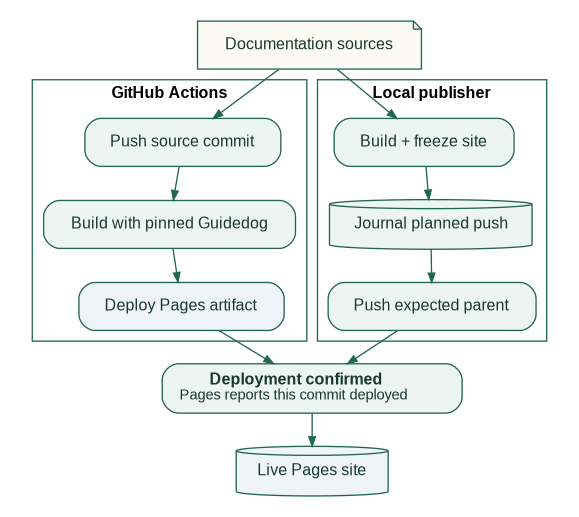
We can publish a Guidedog site to GitHub Pages in one of two ways. GitHub Actions can build
and deploy it on each push, with released Guidedog and GitHub’s official Pages
actions, and no personal token. Or guidedog publish pages can publish it from our own
machine, whenever we ask or whenever the sources change. We use one route per site, because a
repository has one Pages source: GitHub Actions or a branch.
Publish from this machine in one command
From the repository that holds our documentation, we run:
guidedog publish pages
On a machine that has never published, it does each missing step once and says what it does. It asks before anything that changes GitHub or this machine’s permissions:
- Configuration. Without
pages.tomlit reads the repository fromgit remote get-url origin(HTTPS or SSH GitHub URLs) and asks us to confirm it. It finds the nearest project (a folder withconf.toml, here, indocs, or above, up to the repository’s root), and writespages.toml. We can name both ourselves with--repository=OWNER/REPOand--project=DIR. - Token. Without a stored token it offers to sign in with a code on github.com
(GitHub’s device flow). The token goes to the macOS Keychain, the Windows Credential
Manager, or the Secret Service of a Linux desktop. When the GitHub CLI is
signed in, it offers instead to use
gh auth tokenfor this run only. The GitHub CLI’s token is never stored: it belongs togh, which refreshes and revokes it. - Authorization. It shows the account, the repository with its GitHub ID, the branch, and the Pages settings, and asks once whether this machine may publish there. A branch that holds work Guidedog did not publish is never replaced without our explicit answer.
- Pages source. If Pages deploys from Actions or another branch, it asks before pointing Pages at the branch. A repository without a Pages site is set up after the first push, which makes the branch.
- Publication. It builds the project and pushes the whole site in one commit. It waits for GitHub Pages to deploy that commit and prints the live URL.
The next time, every step is done already. publish then builds and publishes
without a question.
In a script, or with --yes, it never asks. --yes answers the confirmations
(repository, authorization, Pages source) with yes. It still never signs in and never
replaces others’ work. A step that needs us fails with pages.guide and a hint that
names the flag or the step command, such as --repository=octo/manual or
guidedog pages auth login.
Publish from this machine, step by step
The step commands stay for scripts and for checking each part. The linked Pages plugin builds the project with Guidedog. It pushes the whole site to a branch of its own in one Git commit.
We write pages.toml beside our project. It names the repository, the branch, and the
credential profile. It holds no secret, so we can commit it:
guidedog pages init --repository=octo/manual --project=docs
Next we store a token for the profile. We make a fine-grained personal access token for the
repository with Contents: read and write, and Pages: read so that publication
can confirm the deployment. If we want setup to configure Pages, it also needs
Pages: write and Administration: write. We paste it when asked. It is not shown, and it never
goes to a file:
guidedog pages auth import --profile=default
guidedog pages auth status
auth login signs in with a code instead, for a GitHub App or OAuth App we
registered with the device flow enabled:
guidedog pages auth login --client-id=YOUR_APP_ID.
We authorize the target, point Pages at the branch, and check that everything is ready:
guidedog pages bind
guidedog pages setup
guidedog pages doctor
bind refuses a branch that holds work Guidedog did not publish. --adopt lets the
next publication replace it. The branch must not be the repository’s default branch.
Publication goes only to a bound target. Guidedog refuses, until we bind again, a pages.toml that names another
repository, a repository that was renamed, transferred, or made again, and another
account’s token.
guidedog publish pages --dry-run
guidedog publish pages
publish builds with warnings as errors (strict = true) and html_baseurl set to
site_url. It lists what it adds, changes, and removes. Then it sends one push that holds
only the files the branch lacks. GitHub moves the branch only if it still has the
commit that was read, so a publication never overwrites a newer one. A .nojekyll
file is added, so that GitHub serves folders such as _static. Then it waits, up to
wait_seconds, for GitHub Pages to deploy that commit.
The exit status says what happened:
- 0: the site is live or was already published.
- 1: nothing was published.
- 2: a usage, configuration, or missing step problem.
- 6: GitHub accepted the publication but has not confirmed the deployment yet.
- 7: it is not known whether the branch moved.
We check later with
guidedog pages status. guidedog pages recover settles a publication whose answer
was lost, and it never moves the branch back.
To publish a site we build ourselves, we write site = "build/site" instead of
project. The folder is copied and checked before it is published.
Publish on every change, with a preview
guidedog pages watch publishes once, then again whenever the sources change and
have been quiet for debounce_ms (at most max_wait_ms after the first change). A
failed build or publication is reported, and the published site stays as it was.
guidedog pages watch --serve also serves the built site on this machine, at
http://127.0.0.1:8000/ (--serve=PORT for another port). We see each build
before GitHub Pages deploys it. One Ctrl+C stops both the watch and the preview.
A scheduler can keep it running. On macOS, a launch agent in
~/Library/LaunchAgents/org.example.docs.plist:
<?xml version="1.0" encoding="UTF-8"?>
<!DOCTYPE plist PUBLIC "-//Apple//DTD PLIST 1.0//EN" "http://www.apple.com/DTDs/PropertyList-1.0.dtd">
<plist version="1.0">
<dict>
  <key>Label</key><string>org.example.docs</string>
  <key>ProgramArguments</key>
  <array>
    <string>/opt/homebrew/bin/guidedog</string>
    <string>pages</string>
    <string>watch</string>
  </array>
  <key>WorkingDirectory</key><string>/Users/me/src/manual</string>
  <key>RunAtLoad</key><true/>
  <key>KeepAlive</key><true/>
</dict>
</plist>
On Linux, a systemd user service, ~/.config/systemd/user/docs-pages.service,
started with systemctl --user enable --now docs-pages. A user service reaches
the desktop’s Secret Service. On a server without one, we give the token with
--credential=env and an Environment=GUIDEDOG_PAGES_TOKEN=... drop-in readable
only by our own account:
[Unit]
Description=Publish the manual to GitHub Pages

[Service]
WorkingDirectory=%h/src/manual
ExecStart=/usr/local/bin/guidedog pages watch
Restart=on-failure

[Install]
WantedBy=default.target
On Windows, a scheduled task at logon, so that the Credential Manager is available:
$action = New-ScheduledTaskAction -Execute "guidedog.exe" -Argument "pages watch" `
    -WorkingDirectory "C:\src\manual"
Register-ScheduledTask -TaskName "Publish manual" -Action $action `
    -Trigger (New-ScheduledTaskTrigger -AtLogOn)
Build and deploy with GitHub Actions
We generate the workflow instead of copying it:
guidedog pages workflow --write
git add .github/workflows/docs-pages.yml
It writes .github/workflows/docs-pages.yml for a project in docs and a source
branch main (--project=DIR, --branch=NAME). The workflow installs this Guidedog release
(--version=X). The archive’s SHA-256 is read from the release’s SHA256SUMS, or
given with --sha256. --offline writes a clearly marked placeholder. The
workflow’s checksum test fails on it, and the command exits with status 1 until we give
--sha256. Without --write it prints the workflow.
In the repository’s Settings -> Pages, we choose GitHub Actions as the publishing
source and restrict the github-pages environment to main.
The workflow it writes is this one:
name: Documentation
on:
  push:
    branches: [main]
  pull_request:
  workflow_dispatch:

permissions:
  contents: read

concurrency:
  group: docs-pages-${{ github.ref }}
  cancel-in-progress: false

defaults:
  run:
    shell: bash

jobs:
  build:
    runs-on: ubuntu-22.04
    timeout-minutes: 15
    permissions:
      contents: read
      pages: read
    steps:
      - uses: actions/checkout@3d3c42e5aac5ba805825da76410c181273ba90b1 # v7.0.1
        with:
          persist-credentials: false

      - name: Install Guidedog
        env:
          GUIDEDOG_VERSION: 1.0.0-beta.16
          GUIDEDOG_SHA256: c41685e1aa74886180fc681d81f2ac890a2ca103d97dab43ee1577f803efc798
        run: |
          set -euo pipefail
          archive="$RUNNER_TEMP/guidedog-linux-amd64.tar.gz"
          url="https://github.com/insanai/guidedog/releases/download/v${GUIDEDOG_VERSION}/guidedog-linux-amd64.tar.gz"
          curl --proto '=https' --tlsv1.2 --fail --show-error --silent --location "$url" -o "$archive"
          printf '%s  %s\n' "$GUIDEDOG_SHA256" "$archive" | sha256sum --check --strict
          mkdir -p "$RUNNER_TEMP/guidedog"
          tar -xzf "$archive" -C "$RUNNER_TEMP/guidedog" --strip-components=1
          echo "$RUNNER_TEMP/guidedog" >> "$GITHUB_PATH"

      - name: Configure Pages
        id: pages
        if: github.ref == 'refs/heads/main' && github.event_name != 'pull_request'
        uses: actions/configure-pages@45bfe0192ca1faeb007ade9deae92b16b8254a0d # v6.0.0

      - name: Build the site
        env:
          PAGES_BASE_URL: ${{ steps.pages.outputs.base_url }}
        run: |
          set -euo pipefail
          guidedog --version
          guidedog build -b html docs build/site -W -D "html_baseurl=$PAGES_BASE_URL"
          test -s build/site/index.html
          touch build/site/.nojekyll

      - name: Upload Pages artifact
        if: github.ref == 'refs/heads/main' && github.event_name != 'pull_request'
        uses: actions/upload-pages-artifact@fc324d3547104276b827a68afc52ff2a11cc49c9 # v5.0.0
        with:
          path: build/site

  deploy:
    if: github.ref == 'refs/heads/main' && github.event_name != 'pull_request'
    needs: build
    runs-on: ubuntu-22.04
    timeout-minutes: 10
    permissions:
      pages: write
      id-token: write
    environment:
      name: github-pages
      url: ${{ steps.deployment.outputs.page_url }}
    steps:
      - name: Deploy
        id: deployment
        uses: actions/deploy-pages@368f82528645a54fb793d4d04e342629a3f51346 # v5.0.1
The build job can read sources. Only the deploy job receives Pages and OIDC
permissions. GitHub supplies its short-lived credentials, so we add no personal token.
The checkout keeps no credentials. Pull requests build but never deploy. The
workflow stays on pull_request, never pull_request_target. Action commits are
pinned by SHA with their versions in comments. The Guidedog archive is checked
against its SHA-256 before it is unpacked.
Check an existing workflow
guidedog pages workflow --check
It reports an older Guidedog release (pages.workflow-outdated), a missing or
placeholder checksum, an action pinned to a tag or to another commit than the reviewed
one (pages.workflow-unpinned, pages.workflow-pin), pull_request_target, and a
checkout that keeps its credentials, each with its line and the fix. We update with
guidedog pages workflow --write --force. Action updates are a separate review: the
pinned commits are listed in gd-pages and change only with a reviewed release.
If the project selects build plugins, we install and register their trusted executables
in the build job before guidedog build. Registrations on our own computer are not
copied to a runner. See Write a plugin.
Tokens and automation
--credential=env takes the token from GUIDEDOG_PAGES_TOKEN for one command and
never stores it. GUIDEDOG_PAGES_CREDENTIAL=env chooses the same for runs that cannot
take the option, such as guidedog publish. A missing or locked credential store is
reported. The token is never written to a plain file instead. auth logout deletes
the stored token. We revoke it at GitHub too.
Through guidedog publish
The Pages plugin is linked into guidedog. guidedog publish pages guides the publication and builds the project with the host’s own engine. guidedog pages init, auth, bind, setup, doctor, watch, status, recover and workflow expose individual steps for scripts and maintenance.
guidedog publish pages --help
guidedog pages workflow --help
No separate publisher program or registration step is needed.
Troubleshooting
Every problem names its code and what to do. The common ones:
| Code | What to do |
|---|---|
pages.unbound |
Run guidedog pages bind: this machine has not been allowed to publish there. |
pages.no-token, pages.credential |
Store a token with auth import or auth login; GitHub refused or expired it. |
pages.permission |
Give the token Contents: read and write for the repository, or approve it for the organization’s single sign-on. |
pages.source, pages.no-site |
Run guidedog pages setup, or change the Pages source in the settings. |
pages.conflict |
Another publication moved the branch first; run the command again. |
pages.ruleset |
A ruleset or branch protection refused the push; allow the account to push. |
pages.guide |
A step needs our answer and the run may not ask; run it in a terminal, or do the step the hint names. |
pages.unsettled |
Run guidedog pages recover. |
pages.deployment |
The branch holds the site, but the Pages build failed; see the repository’s Actions tab. |