Write a plugin
A plugin adds a service to Guidedog. A build plugin can transform source text,
transform a rendered HTML page, or supply static files. A publisher sends a
finished site to a destination. Both are ordinary Rust traits from the
gd-plugins crate. We implement one once. The same value can be linked into
a custom guidedog binary or served as a separate program.
This chapter builds a product badge. It replaces {{product}} in source text,
adds a label to HTML pages, and supplies the label’s CSS. GitHub Pages then shows
how the same plugin foundation supports a service with external effects.
1. Understand the boundary
A build plugin implements gd_plugins::BuildPlugin. Its process_source,
process_html and collect_assets methods are optional. The default methods mean
the service is absent (text passes through, no assets). load reads the plugin’s
configuration into the value itself. Dropping the value releases what it holds. The
host owns the build.
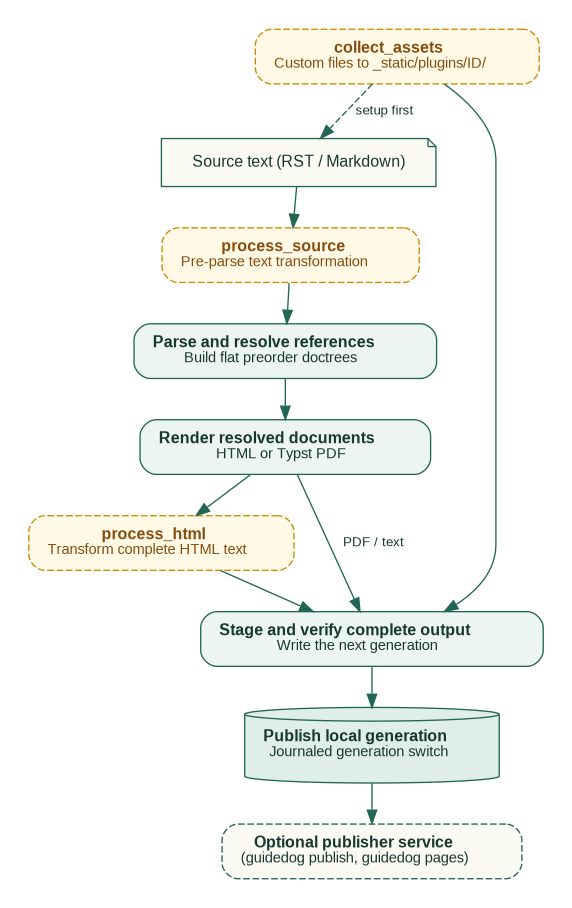
Source hooks run before parsing each primary RST or Markdown document. They apply
to PDF and text builds too. Includes remain the engine’s responsibility. HTML
hooks receive complete pages, including generated indexes and additional pages.
Generated assets belong to HTML builders and live below _static/plugins/ID/.
The host collects them once during plugin setup, before reading documents.
They are fixed for that build. Source and HTML hooks cannot add later assets.
A Plugin is build hooks or a publisher, never both. Normal builds cannot invoke
a publishing service. A plugin reaches a build in one of two ways:
- Linked
-
A custom
guidedogbinary compiles the plugin crate in and passes its plugins to the command line withgd_cli::run_with. Rust has no stable ABI, so there is no loading of dynamic libraries. Linked code is trusted like the rest of the binary. - Served
-
The plugin crate’s small binary calls
gd_plugins::serve_plugin. We register it withguidedog plugin register, which pins its SHA-256. Then it runs as a child process per build, behind a bounded JSON Lines protocol. A crash or stall becomes a diagnostic. Registration is explicit, and it is not a sandbox: an installed plugin is a trusted program.
2. Compile the working example
The product badge lives in the Guidedog repository at
crates/gd-plugins/examples/build_plugin. badge.rs is the plugin, and main.rs is
the program that serves it. We start at the checkout root, with a Rust toolchain
installed. On macOS or Linux, run:
cargo build --release -p guidedog-cmd
cargo build --release -p gd-plugins --example build_plugin
target/release/guidedog quickstart build/plugin-tutorial -q -p Orbit -a Team
On Windows, run these commands in PowerShell:
cargo build --release -p guidedog-cmd
cargo build --release -p gd-plugins --example build_plugin
target/release/guidedog.exe quickstart build/plugin-tutorial -q -p Orbit -a Team
The first two commands build Guidedog and the plugin program,
target/release/examples/build_plugin. The third creates the documentation
project. Registration follows after configuration. Users of a packaged plugin need no
Rust toolchain.
3. Select it for a project
Replace build/plugin-tutorial/conf.toml with:
project = "Orbit"
plugins = ["product-badge"]
plugin_timeout = 60

[plugin_configs]
product-badge = "badge.toml"
Create build/plugin-tutorial/badge.toml:
product = "Orbit"
Replace build/plugin-tutorial/index.rst with:
Welcome
=======

Hello {{product}}.
Configuration paths are relative to the project configuration directory. Plugins
run in the order listed in plugins. Merely registering a program does not run it.
Register after writing the configuration. Registration checks the build plugin in child processes before recording its checksum. On macOS or Linux:
target/release/guidedog plugin register product-badge \
  "$PWD/target/release/examples/build_plugin" \
  --project=build/plugin-tutorial --config=badge.toml
On Windows, use one PowerShell command:
target/release/guidedog.exe plugin register product-badge "$PWD/target/release/examples/build_plugin.exe" --project=build/plugin-tutorial --config=badge.toml
4. Build and observe
On macOS or Linux, run:
target/release/guidedog build html build/plugin-tutorial -W
target/release/guidedog serve build/plugin-tutorial
On Windows, run:
target/release/guidedog.exe build html build/plugin-tutorial -W
target/release/guidedog.exe serve build/plugin-tutorial
Open the address printed by the server. The page says “Hello Orbit.” and has an
Orbit badge. Its stylesheet is _static/plugins/product-badge/banner.css.
Change the configured name to Comet and build again. Both the text and badge
change. A further unchanged build writes no output files.
5. Read the implementation
The complete plugin below is the source compiled in step 2. Download
badge.rs and
main.rs to keep a local copy.
In our own crate, badge.rs becomes the library (src/lib.rs) and main.rs
the binary, with gd-plugins and gd-toml as dependencies.
//! The product badge, a complete build plugin: it replaces `{{product}}` in source
//! text, labels HTML pages, and supplies the label's stylesheet. Its settings file holds
//! `product = "Orbit"`. It also adds a command to the command line, `guidedog badge
//! preview NAME`, which writes the label for NAME to `badge-preview.html`.
//!
//! In a plugin crate this file is the library: a custom `guidedog` binary links it with
//! `Registry::new(vec![badge::plugin()])`, and the crate's own small binary
//! (`main.rs`) serves the same `Badge` as an installed program.
use std::borrow::Cow;
use gd_plugins::{
Asset, BuildPlugin, CommandContext, CommandInfo, CommandOption, Hooks, HtmlInput, LoadContext,
MAX_PLUGIN_TEXT, Plugin, PluginInfo, Problem, SourceInput,
};
const MARKER: &str = "{{product}}";
const CSS: &str = ".product-badge { border-inline-start: 3px solid #216553; \
padding: .5rem 1rem; margin: 1rem; font-weight: 700; }\n";
/// The plugin a host links, or a program serves: one implementation, two deployments.
pub fn plugin() -> Plugin {
Plugin::build(Badge::default())
}
/// The plugin's state: the product name `load` read. The unloaded prototype is empty.
#[derive(Debug, Clone, Default)]
pub struct Badge {
product: String,
}
impl BuildPlugin for Badge {
fn info(&self) -> PluginInfo {
PluginInfo::new("product-badge", "Product badge", "1.0.0", Hooks::ALL)
}
fn commands(&self) -> Vec<CommandInfo> {
vec![
CommandInfo::new("badge preview", "Write a product's label to badge-preview.html")
.with_help("Writes the label the plugin adds to pages, for the product NAME.")
.with_option(CommandOption::switch("--quiet-ok", "Print nothing on success")),
]
}
fn run_command(
&mut self,
ctx: &mut CommandContext<'_>,
name: &str,
args: &[String],
) -> Result<i32, Problem> {
let product = args.iter().find(|a| !a.starts_with('-'));
let (Some(product), "badge preview") = (product, name) else {
return Err(Problem::new(
"badge.usage",
"Name the product",
"guidedog badge preview needs the product's name.",
)
.hint("Write guidedog badge preview Orbit.")
.exit(2));
};
let html = format!("<p class=\"product-badge\">{product}</p>\n<!-- {} -->\n", ctx.config);
let path = ctx.dir.join("badge-preview.html");
std::fs::write(&path, html).map_err(|e| {
Problem::new("badge.io", "Cannot write the preview", &e.to_string())
.hint("Run the command in a folder you may write to.")
.path(&path.to_string_lossy())
.exit(4)
})?;
if !args.iter().any(|a| a == "--quiet-ok") {
ctx.print(&format!("Wrote {}\n", path.display()));
}
Ok(0)
}
fn load(&mut self, ctx: &mut LoadContext<'_>) -> Result<(), Problem> {
let text = ctx.read_config()?;
let path = ctx.options().config.clone();
let root = gd_toml::parse(&text).map_err(|e| {
Problem::new("badge.toml", "Cannot read the badge settings", &e.message)
.hint("Write product = \"Orbit\" in this TOML file.")
.path(&format!("{path}:{}", e.line))
.exit(2)
})?;
let product = root.get("product").and_then(|v| v.as_str()).unwrap_or_default();
if product.is_empty() || product.len() > 256 || product.contains(['\r', '\n', '\0']) {
return Err(Problem::new(
"badge.product",
"The product name is missing or invalid",
"product must be a nonempty string on one line, at most 256 bytes long.",
)
.hint("Set product = \"Orbit\" in this file.")
.path(&path)
.exit(2));
}
self.product = product.to_string();
Ok(())
}
fn process_source<'a>(&mut self, input: &SourceInput<'a>) -> Result<Cow<'a, str>, Problem> {
if !input.text.contains(MARKER) {
return Ok(Cow::Borrowed(input.text));
}
// Check the expansion before allocating it.
let count = input.text.matches(MARKER).count();
let growth = self.product.len().saturating_sub(MARKER.len());
if input.text.len() + count * growth > MAX_PLUGIN_TEXT {
return Err(Problem::new(
"badge.source-size",
"The expanded source would be too large",
"Replacing every product marker would exceed the 8 MiB source limit.",
)
.hint("Use fewer markers, a shorter product name, or split the document.")
.path(input.path)
.exit(2));
}
Ok(Cow::Owned(input.text.replace(MARKER, &self.product)))
}
fn process_html<'a>(&mut self, input: &HtmlInput<'a>) -> Result<Cow<'a, str>, Problem> {
let tags = (input.text.rfind("</head>"), input.text.rfind("</body>"));
let (Some(head), Some(body)) = tags else {
return Err(Problem::new(
"badge.html",
"The badge needs a complete HTML page",
"The selected template has no closing head or body tag.",
)
.hint("Add </head> and </body> to the template, or disable product-badge.")
.path(input.path)
.exit(2));
};
let body = body.max(head);
let css = format!("<link rel=\"stylesheet\" href=\"{}banner.css\">\n", input.assets_url);
let badge = format!(
"<aside class=\"product-badge\" aria-label=\"Product\">{}</aside>\n",
escape_html(&self.product)
);
let mut out = String::with_capacity(input.text.len() + css.len() + badge.len());
out.push_str(&input.text[..head]);
out.push_str(&css);
out.push_str(&input.text[head..body]);
out.push_str(&badge);
out.push_str(&input.text[body..]);
Ok(Cow::Owned(out))
}
fn collect_assets(&mut self) -> Result<Vec<Asset>, Problem> {
Ok(vec![Asset::new("banner.css", CSS)])
}
}
fn escape_html(text: &str) -> String {
text.replace('&', "&").replace('<', "<").replace('>', ">")
}
plugin() is the public descriptor. Plugin::build keeps the unloaded Badge
as a prototype and clones it for every session, so sessions never share state. info
names the plugin and declares its hooks. load reads the configuration through
LoadContext::read_config. That call bounds its size, declares the file as a dependency
and fingerprints the bytes. load then checks the setting and keeps it in the value.
The source hook returns Cow::Borrowed when the text has no marker, so unchanged
text is never copied. It checks the expanded size against MAX_PLUGIN_TEXT before
allocating. It replaces every marker, including markers inside code blocks. This is a
text transformation, not a markup parser.
The HTML hook escapes the label and inserts it before the last closing body tag.
It uses assets_url supplied by the host, so nested pages link to the right CSS.
This small example expects literal lowercase closing head and body tags. A plugin
that rewrites arbitrary HTML should use a suitable parser and state its contract.
The assets hook returns ordinary owned values. There is nothing to release. Hook
results are plain Cow, String and Vec values that the host takes over.
The program that serves the same plugin over standard streams is three lines:
//! The product badge served as an installed program. The same `Badge` type is linked
//! into a host through `badge::plugin()`; this binary only adds the protocol loop.
//!
//! ```text
//! cargo build --release -p gd-plugins --example build_plugin
//! guidedog plugin register product-badge "$PWD/target/release/examples/build_plugin" \
//!     --project=docs --config=badge.toml
//! ```
//!
//! Then select it in the project's `conf.toml`:
//!
//! ```toml
//! plugins = ["product-badge"]
//! [plugin_configs]
//! product-badge = "badge.toml"
//! ```

mod badge;

fn main() -> std::process::ExitCode {
    gd_plugins::serve_plugin(&badge::plugin())
}
serve_plugin handles negotiation and dispatch and returns the exit code. Keep
protocol output on stdout, and write human logs to stderr.
6. Link it into our own guidedog
A plugin used by every build on a machine, or shipped with a team’s tools, can be
compiled into a custom guidedog binary instead of being registered. We create a binary
crate that depends on gd-cli, gd-plugins and our plugin crate (badge here),
and give it this main:
use std::process::ExitCode;

use gd_plugins::Registry;

fn main() -> ExitCode {
    // Registry::new validates IDs, versions and hooks, so a bad list fails here.
    let linked = match Registry::new(vec![badge::plugin()]) {
        Ok(registry) => registry,
        Err(problem) => {
            let style = gd_report::Style::default();
            eprint!("{}", gd_report::render_text(&problem.report(), &style));
            return ExitCode::from(2);
        }
    };
    gd_cli::run_with(linked)
}
The binary accepts every guidedog command and option. A build looks up each ID in
plugins among the linked plugins first, then in the machine registry. So the
project’s conf.toml is the same for both deployments and needs no registration
step. guidedog plugin list shows linked plugins beside registered ones.
A linked plugin’s identity in the cache is its ID, its version and the host binary’s own build identity, because its code is part of the host. Rebuilding the binary rebuilds the affected output. Linked code runs in the host process, so a panic or a hang in a hook reaches the build. We serve a plugin as a program when it should be isolated.
7. Keep state and caching explicit
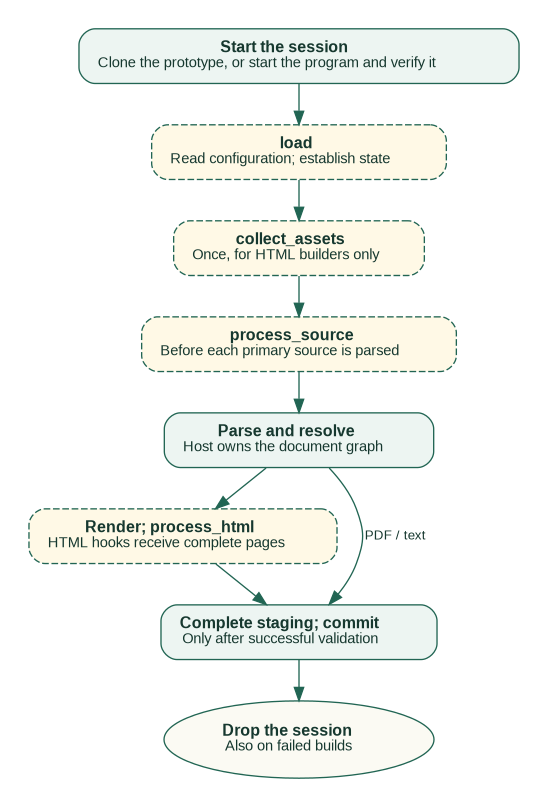
A plugin value is one build’s session. The host creates a fresh session per
selected plugin per build, from the prototype. It drops the session when the build ends,
whether it succeeded or failed. Drop replaces an unload callback: we close files or
connections there.
Use LoadContext::read_config and read_file during load. They fingerprint the
bytes actually read and declare dependencies. Keep loaded state unchanged throughout
the build. If we read other files ourselves, we declare their paths with
declare_dependency and add a fingerprint of the loaded values with
add_cache_key. Selected environment values go there too. The context only appends,
so the fingerprints the helpers recorded cannot be erased. A plugin must not depend on undeclared
changing data.
The host includes identity, configuration, dependencies, cache key, builder, language
and generated assets in cache invalidation. Hooks take &mut self. When reading
workers share a session, the host serializes calls through a Mutex, so plugins need
no synchronization. Installed programs have a deadline per whole request, including
pipe writes.
Text is limited to 8 MiB per hook and configuration to 1 MiB. Each plugin may supply
at most 256 assets and 16 MiB of asset bytes, and declare at most 256 dependencies.
Paths must be portable and relative. Duplicate names, case-only collisions, traversal
and conflicts with project files are refused. --untrusted refuses any build that
selects plugins. A child process’s memory is outside the host’s build budget.
8. Explain failures and test them
Return a Problem with a code, title, affected path, explanation, concrete
correction and nonzero exit status: Problem::new(code, title, message) with
.hint(...), .path(...) and .exit(...). For example, product = 42 is
invalid. The badge explains that a string is required and suggests
product = "Orbit". The host adds which plugin stopped and in which stage. Markup
diagnostics after expansion identify plugin-expanded input and show its actual
excerpt. They do not pretend expanded line numbers belong to the original.
Test the plugin value directly with PluginSession::load and its hook methods, and
through its program with process_plugin. Cover changed settings, unchanged
rebuilds, nested links, invalid markup, asset collisions, cancellation and timeouts.
A failed build must preserve the previous site. The crate’s own tests run the badge
both linked and served and require identical outputs.
9. Add a publishing service
A publisher implements gd_plugins::Publisher and is wrapped with
Plugin::publisher. Its methods are info, load, plan, publish, and
optional status and recover. A session holds configuration and credentials. A
Snapshot freezes the checked site files. A Plan compares that snapshot with a
target baseline. An Outcome reports the verified result. These are ordinary values,
and there is nothing to release.
Start with publisher.rs
(crates/gd-plugins/examples/publisher.rs), a working publisher that replaces a local
folder whole. Then follow the GitHub Pages publisher in crates/gd-pages.
Configuration and machine binding establish authority. Planning reads the target.
Publishing writes a durable journal before one conditional Git push. Status and
recovery settle the outcome. Nothing in a source or HTML hook grants publication
authority. guidedog publish --publisher=ID --config=FILE builds the project and
runs a publisher. --dry-run stops after the plan.
A remote acceptance is not a live deployment. Accepted and Pending return
6. An uncertain write returns Unknown and 7, with status or recovery directions.
Never retry an uncertain write blindly. See Publish to GitHub Pages for the
complete user workflow.
10. Add a command to Guidedog
A plugin can also add commands to guidedog’s own command line. The badge adds one:
$ guidedog badge preview Orbit
Wrote /home/ada/docs/badge-preview.html
The GitHub Pages, discussion, and static site plugins work the same way: guidedog publish pages, guidedog dsc, and guidedog ssg are their commands, not gd-cli’s. We declare a command with commands and run it with run_command:
fn commands(&self) -> Vec<CommandInfo> {
    vec![CommandInfo::new("badge preview", "Write a product's label to badge-preview.html")
        .with_help("Writes the label the plugin adds to pages, for the product NAME.")
        .with_option(CommandOption::switch("--quiet-ok", "Print nothing on success"))]
}

fn run_command(&mut self, ctx: &mut CommandContext<'_>, name: &str, args: &[String])
    -> Result<i32, Problem> {
    // ... read args, write the file in ctx.dir ...
    ctx.print("Wrote badge-preview.html\n");
    Ok(0)
}
The words of the name decide where the command appears. badge preview is a new command; publish NAME is a target of guidedog publish. A plugin cannot replace a command guidedog has. The summary, help and options we declare become the command’s --help and its line under PLUGIN COMMANDS in guidedog --help, and a mistyped name gets a “Did you mean” that knows our command.
The CommandContext is everything Guidedog lends the command. print and eprint write to its output. ask and confirm put a question to the person, and answer nothing when nobody can be asked (a script, a CI job), so a command never hangs. build_project has Guidedog build a project, HTML or PDF, into a folder we name, with its engine and its linked plugins. dir is the folder the command was started in, and config the plugin’s configuration file when the project’s plugin_configs names one. We return the exit status, or a Problem with a hint, which Guidedog reports.
The same command works in both deployments. Linked, it runs inside guidedog. Registered, guidedog starts our program with --guidedog-command and a request, on the same terminal, so questions and progress reach the person directly; serve_plugin answers that request without any code of ours. guidedog plugin inspect ID lists the commands a plugin adds.
11. Version and distribute the contract
The build-plugin interface (PLUGIN_API_VERSION) is 1.0 and uses protocol
guidedog-build-plugin 1.0. The publisher interface (API_VERSION) is 1.1 and
keeps guidedog-publisher protocol 1.0. These are separate contracts. The wire
format is stable, so registered programs from earlier releases keep working. Product versions are separate from interface versions.
New hooks arrive as trait methods with “absent” defaults, and host-made inputs are
#[non_exhaustive], so a new field does not break a plugin. Contributed commands have
their own command protocol (1.0), announced in optional handshake fields: programs
without commands are unchanged.
Register each rebuilt program deliberately, because its checksum changes. guidedog plugin inspect ID shows its kind and declared hooks. The public catalog describes plugins.
It does not download, install or run them. Custom markup readers, renderers,
directives and roles are not part of this interface. They use the
guidedoc::Registry API in a program that embeds the engine.
12. Check a plugin before registering it
guidedog plugin check PATH --project=DIR --config=FILE exercises a build plugin
without changing the registry. Registration runs the same checks automatically:
two fresh loads, repeated source and HTML results, generated asset validation and
cleanup. --timeout=SECONDS defaults to 60 per process request. Supply a real
configuration when the plugin needs one. Relative configuration paths resolve
from --project, whose default is the current directory.
Passing checks shows that the plugin works with Guidedog. It is not a proof of safety. Guidedog keeps checking every runtime response and runs installed plugins in separate processes. A crash, bounds failure or stalled process becomes a diagnostic and cannot publish an incomplete generation. Linked plugins remain trusted code.
Generic checks never invoke a publisher. Qualify publishers with their own tests and an explicitly configured dry run. The protocol and the SDK’s design are recorded in Plugins: SDK and process protocols.