Custom directives and dynamic content
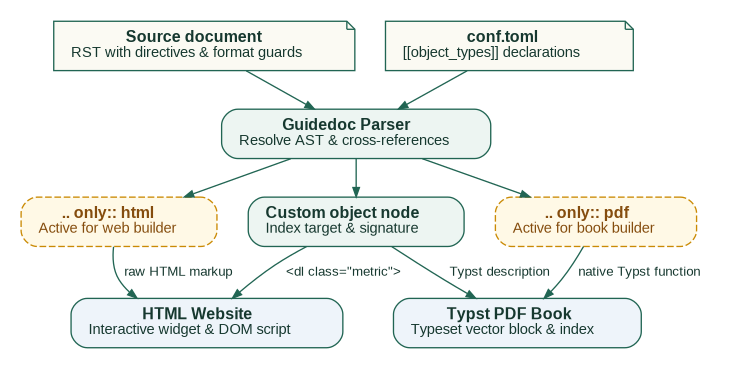
Guidedog publishes the same document tree to an interactive HTML website and a typeset PDF book. Web readers benefit from interactive calculators, search filters, and embedded widgets. Book readers benefit from balanced columns, callout cards, and vector typography.
This tutorial builds a project that demonstrates both without duplicating prose. We declare a custom
semantic directive in conf.toml, add an interactive calculator for web readers, and design a
print-quality callout block for the PDF book.
1. Create the project
Start in a clean directory and run:
guidedog quickstart telemetry -q -p "Cluster Telemetry" -a "Operations Team" -v 1.0
Move into the new directory:
cd telemetry
2. Declare custom domain directives in conf.toml
A project often needs structured entities that standard domains (such as Python or C++) do not cover.
Rather than requiring a Python runtime or custom extension compiler, Guidedog lets us declare custom
directives and roles in conf.toml.
Open conf.toml and append the declaration for a metric directive:
[[object_types]]
directive = "metric"
role = "metric"
index = "pair: %s; cluster telemetry"
name = "first-word"
display = "Metric: %s"
This single declaration establishes a complete syntax contract:
.. metric:: p99_latency (milliseconds)describes the metric.:metric:`p99_latency`links to the definition from any document.- The index table automatically generates a pair index entry (
p99_latency; cluster telemetry). - In HTML, Guidedog generates a semantic definition list with CSS anchor hooks.
- In PDF, Guidedog typesets a description and an index entry linking to its page.
4. Build and inspect both publications
Build the HTML website:
guidedog build -b html . _build/html -W
Open _build/html/index.html in a browser or run guidedog serve. Notice that:
- The
:metric:`p99_latency`reference resolves directly to the definition anchor. - The interactive calculator slider is rendered and active in the web DOM.
- The PDF callout block is omitted entirely, without emitting warnings.
Now build the PDF book:
guidedog build -b pdf . _build/pdf -W
Open _build/pdf/cluster-telemetry-en.pdf (or the inspection source at _build/pdf/book-en.typ). Notice that:
- The slider and raw HTML are completely absent.
- The Typst
#rect(...)vector box is typeset with native margins, borders, and typography. - The book’s index includes an entry under
p99_latency.
5. Custom Typst functions in theme templates
When we reuse formatting across chapters, we append a Typst function to _templates/theme.typ:
#let status-badge(status, text-content) = {
  let bg = if status == "ok" { rgb("#edf5f2") } else { rgb("#fff9e6") }
  let fg = if status == "ok" { rgb("#216553") } else { rgb("#854d0e") }
  box(fill: bg, inset: (x: 6pt, y: 3pt), radius: 3pt, baseline: 10%)[
    #text(fill: fg, size: 0.85em, weight: "bold")[#text-content]
  ]
}
In any document, invoke the function inside a raw Typst block:
.. only:: pdf

   .. raw:: typst

      #import "/_templates/theme.typ": status-badge
      #status-badge("ok")[SLO COMPLIANT]
Import the function explicitly: the book template’s own imports are scoped to its module and do not expose helpers to document content. For many call sites, place this import in a project preamble selected by pdf_preamble.