编写插件
插件为 Guidedog 增加一项服务。构建插件可以转换源文本、转换渲染好的 HTML 页面,或提供静态文件。发布器把完成的网站发送到目标位置。两者都是 gd-plugins crate 中的普通 Rust trait。我们只需实现一次,同一个值既可以链接进自定义的 guidedog 二进制文件,也可以作为独立程序提供服务。
本章实现一个产品徽章插件。它替换源文本中的 {{product}},在 HTML 页面上添加标签,并提供相应的 CSS。随后以 GitHub Pages 为例,说明同一套插件基础如何支持具有外部副作用的服务。
1. 理解接口边界
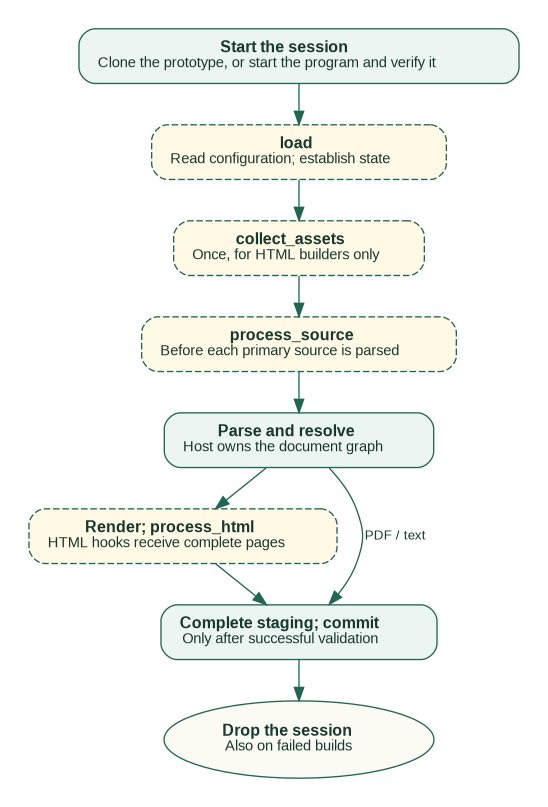
构建插件实现 gd_plugins::BuildPlugin。其中的 process_source、process_html 和 collect_assets 方法均为可选,默认实现表示不提供对应服务(文本原样通过、不添加静态资源)。load 将插件配置读入实例自身;销毁(drop)该实例即释放其持有的资源。构建流程由宿主掌控。
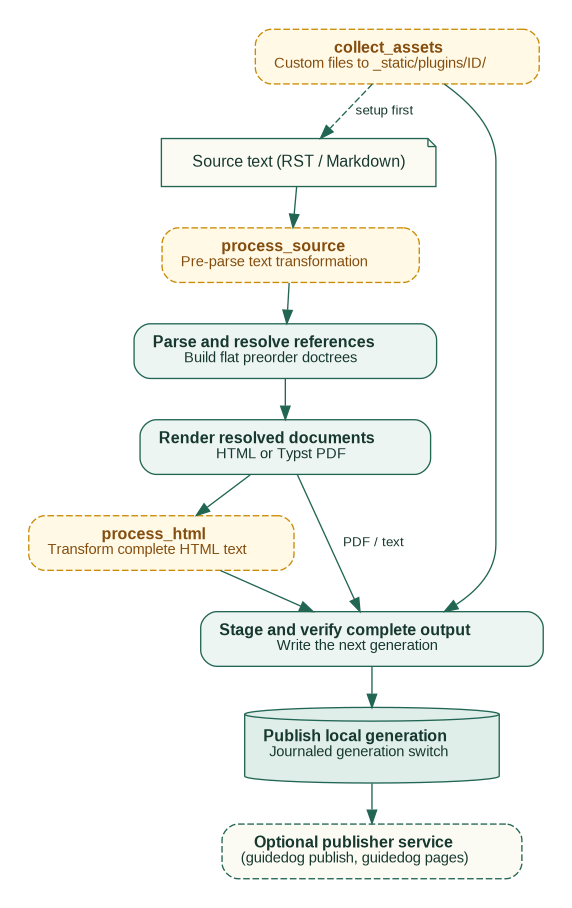
源文本钩子在解析每篇主 RST 或 Markdown 文档前运行,对 PDF 和纯文本构建同样生效;include 包含仍由引擎负责。HTML 钩子接收完整页面(含自动生成的索引页与附加页面)。插件生成的静态资源归属 HTML 构建器,存放在 _static/plugins/ID/ 下;宿主在插件初始化阶段、读取文档之前一次性收集这些资源,并在当次构建中保持固定,源文本钩子和 HTML 钩子不能在后续阶段追加资源。
一个 Plugin 要么是构建钩子,要么是发布器,不能两者兼有。普通构建无法调用发布服务。插件进入构建的方式有两种:
- 链接
-
自定义的
guidedog二进制文件把插件 crate 编译进来,并通过gd_cli::run_with把插件交给命令行。Rust 没有稳定的 ABI,所以不加载动态库。链接进来的代码与二进制文件的其他部分一样受信任。 - 服务
-
插件 crate 的一个小型二进制程序调用
gd_plugins::serve_plugin。我们用guidedog plugin register注册它,同时固定其 SHA-256。之后,它在每次构建时作为子进程运行,通过有界的 JSON Lines 协议通信。崩溃或卡死会变成一条诊断信息。注册需要显式进行,但它不是沙箱:已安装的插件是受信任的程序。
2. 编译可运行的示例
产品徽章示例位于 Guidedog 仓库的 crates/gd-plugins/examples/build_plugin。badge.rs 是插件本身,main.rs 是提供该插件服务的程序。我们在检出的仓库根目录下开始,并已安装 Rust 工具链。在 macOS 或 Linux 上运行:
cargo build --release -p guidedog-cmd
cargo build --release -p gd-plugins --example build_plugin
target/release/guidedog quickstart build/plugin-tutorial -q -p Orbit -a Team
在 Windows 上,在 PowerShell 中运行以下命令:
cargo build --release -p guidedog-cmd
cargo build --release -p gd-plugins --example build_plugin
target/release/guidedog.exe quickstart build/plugin-tutorial -q -p Orbit -a Team
前两条命令构建 Guidedog 和插件程序 target/release/examples/build_plugin。第三条命令创建文档项目。配置完成后再注册。使用打包好的插件的用户不需要 Rust 工具链。
3. 为项目选择插件
将 build/plugin-tutorial/conf.toml 替换为:
project = "Orbit"
plugins = ["product-badge"]
plugin_timeout = 60

[plugin_configs]
product-badge = "badge.toml"
创建 build/plugin-tutorial/badge.toml:
product = "Orbit"
将 build/plugin-tutorial/index.rst 替换为:
Welcome
=======

Hello {{product}}.
配置路径相对于项目配置目录。插件按照 plugins 中的顺序运行。仅仅注册程序不会运行它。
写好配置后再注册插件。注册时先在子进程中检查构建插件,通过后才记录校验值。在 macOS 或 Linux 上:
target/release/guidedog plugin register product-badge \
  "$PWD/target/release/examples/build_plugin" \
  --project=build/plugin-tutorial --config=badge.toml
在 Windows 上,用一条 PowerShell 命令:
target/release/guidedog.exe plugin register product-badge "$PWD/target/release/examples/build_plugin.exe" --project=build/plugin-tutorial --config=badge.toml
4. 构建并查看结果
在 macOS 或 Linux 上运行:
target/release/guidedog build html build/plugin-tutorial -W
target/release/guidedog serve build/plugin-tutorial
在 Windows 上运行:
target/release/guidedog.exe build html build/plugin-tutorial -W
target/release/guidedog.exe serve build/plugin-tutorial
打开服务器打印的网址。页面会显示“Hello Orbit.”和 Orbit 徽章,样式表为 _static/plugins/product-badge/banner.css。将配置名称改为 Comet 后重建,正文和徽章都会变化。随后不改动再构建,便不会重写输出文件。
5. 阅读实现
下面的完整插件就是第 2 步编译的源码。下载 badge.rs 和 main.rs 即可保留一份本地副本。在我们自己的 crate 中,badge.rs 作为库(src/lib.rs),main.rs 作为二进制程序,并以 gd-plugins 和 gd-toml 为依赖。
//! The product badge, a complete build plugin: it replaces `{{product}}` in source
//! text, labels HTML pages, and supplies the label's stylesheet. Its settings file holds
//! `product = "Orbit"`. It also adds a command to the command line, `guidedog badge
//! preview NAME`, which writes the label for NAME to `badge-preview.html`.
//!
//! In a plugin crate this file is the library: a custom `guidedog` binary links it with
//! `Registry::new(vec![badge::plugin()])`, and the crate's own small binary
//! (`main.rs`) serves the same `Badge` as an installed program.
use std::borrow::Cow;
use gd_plugins::{
Asset, BuildPlugin, CommandContext, CommandInfo, CommandOption, Hooks, HtmlInput, LoadContext,
MAX_PLUGIN_TEXT, Plugin, PluginInfo, Problem, SourceInput,
};
const MARKER: &str = "{{product}}";
const CSS: &str = ".product-badge { border-inline-start: 3px solid #216553; \
padding: .5rem 1rem; margin: 1rem; font-weight: 700; }\n";
/// The plugin a host links, or a program serves: one implementation, two deployments.
pub fn plugin() -> Plugin {
Plugin::build(Badge::default())
}
/// The plugin's state: the product name `load` read. The unloaded prototype is empty.
#[derive(Debug, Clone, Default)]
pub struct Badge {
product: String,
}
impl BuildPlugin for Badge {
fn info(&self) -> PluginInfo {
PluginInfo::new("product-badge", "Product badge", "1.0.0", Hooks::ALL)
}
fn commands(&self) -> Vec<CommandInfo> {
vec![
CommandInfo::new("badge preview", "Write a product's label to badge-preview.html")
.with_help("Writes the label the plugin adds to pages, for the product NAME.")
.with_option(CommandOption::switch("--quiet-ok", "Print nothing on success")),
]
}
fn run_command(
&mut self,
ctx: &mut CommandContext<'_>,
name: &str,
args: &[String],
) -> Result<i32, Problem> {
let product = args.iter().find(|a| !a.starts_with('-'));
let (Some(product), "badge preview") = (product, name) else {
return Err(Problem::new(
"badge.usage",
"Name the product",
"guidedog badge preview needs the product's name.",
)
.hint("Write guidedog badge preview Orbit.")
.exit(2));
};
let html = format!("<p class=\"product-badge\">{product}</p>\n<!-- {} -->\n", ctx.config);
let path = ctx.dir.join("badge-preview.html");
std::fs::write(&path, html).map_err(|e| {
Problem::new("badge.io", "Cannot write the preview", &e.to_string())
.hint("Run the command in a folder you may write to.")
.path(&path.to_string_lossy())
.exit(4)
})?;
if !args.iter().any(|a| a == "--quiet-ok") {
ctx.print(&format!("Wrote {}\n", path.display()));
}
Ok(0)
}
fn load(&mut self, ctx: &mut LoadContext<'_>) -> Result<(), Problem> {
let text = ctx.read_config()?;
let path = ctx.options().config.clone();
let root = gd_toml::parse(&text).map_err(|e| {
Problem::new("badge.toml", "Cannot read the badge settings", &e.message)
.hint("Write product = \"Orbit\" in this TOML file.")
.path(&format!("{path}:{}", e.line))
.exit(2)
})?;
let product = root.get("product").and_then(|v| v.as_str()).unwrap_or_default();
if product.is_empty() || product.len() > 256 || product.contains(['\r', '\n', '\0']) {
return Err(Problem::new(
"badge.product",
"The product name is missing or invalid",
"product must be a nonempty string on one line, at most 256 bytes long.",
)
.hint("Set product = \"Orbit\" in this file.")
.path(&path)
.exit(2));
}
self.product = product.to_string();
Ok(())
}
fn process_source<'a>(&mut self, input: &SourceInput<'a>) -> Result<Cow<'a, str>, Problem> {
if !input.text.contains(MARKER) {
return Ok(Cow::Borrowed(input.text));
}
// Check the expansion before allocating it.
let count = input.text.matches(MARKER).count();
let growth = self.product.len().saturating_sub(MARKER.len());
if input.text.len() + count * growth > MAX_PLUGIN_TEXT {
return Err(Problem::new(
"badge.source-size",
"The expanded source would be too large",
"Replacing every product marker would exceed the 8 MiB source limit.",
)
.hint("Use fewer markers, a shorter product name, or split the document.")
.path(input.path)
.exit(2));
}
Ok(Cow::Owned(input.text.replace(MARKER, &self.product)))
}
fn process_html<'a>(&mut self, input: &HtmlInput<'a>) -> Result<Cow<'a, str>, Problem> {
let tags = (input.text.rfind("</head>"), input.text.rfind("</body>"));
let (Some(head), Some(body)) = tags else {
return Err(Problem::new(
"badge.html",
"The badge needs a complete HTML page",
"The selected template has no closing head or body tag.",
)
.hint("Add </head> and </body> to the template, or disable product-badge.")
.path(input.path)
.exit(2));
};
let body = body.max(head);
let css = format!("<link rel=\"stylesheet\" href=\"{}banner.css\">\n", input.assets_url);
let badge = format!(
"<aside class=\"product-badge\" aria-label=\"Product\">{}</aside>\n",
escape_html(&self.product)
);
let mut out = String::with_capacity(input.text.len() + css.len() + badge.len());
out.push_str(&input.text[..head]);
out.push_str(&css);
out.push_str(&input.text[head..body]);
out.push_str(&badge);
out.push_str(&input.text[body..]);
Ok(Cow::Owned(out))
}
fn collect_assets(&mut self) -> Result<Vec<Asset>, Problem> {
Ok(vec![Asset::new("banner.css", CSS)])
}
}
fn escape_html(text: &str) -> String {
text.replace('&', "&").replace('<', "<").replace('>', ">")
}
plugin() 是公开的描述符。Plugin::build 把尚未加载的 Badge 作为原型保存,并为每个会话克隆一份,所以会话之间从不共享状态。info 给出插件名称并声明它的钩子。load 通过 LoadContext::read_config 读取配置。这个调用会限制配置的大小,把该文件声明为依赖,并为其字节计算指纹。随后 load 检查设置并把它保存在值中。
文本中没有标记时,源钩子返回 Cow::Borrowed,未改变的文本从不复制。它在分配内存之前,先用 MAX_PLUGIN_TEXT 检查展开后的大小。它会替换所有标记,包括代码块中的标记。这是文本转换,而不是标记语言解析器。
HTML 钩子对标签文字做转义,把它插在最后一个 body 结束标签前。它使用宿主提供的 assets_url,保证嵌套页面也能正确链接 CSS。这个小示例要求 head 和 body 的结束标签使用小写字面形式。需要改写任意 HTML 的插件应使用合适的解析器,并说明自身的接口约定。
资源钩子直接返回普通自有值,无需额外释放;各钩子的返回值均为由宿主接管的普通 Cow、String 和 Vec 值。
通过标准流提供同一插件服务的程序只有三行:
//! The product badge served as an installed program. The same `Badge` type is linked
//! into a host through `badge::plugin()`; this binary only adds the protocol loop.
//!
//! ```text
//! cargo build --release -p gd-plugins --example build_plugin
//! guidedog plugin register product-badge "$PWD/target/release/examples/build_plugin" \
//!     --project=docs --config=badge.toml
//! ```
//!
//! Then select it in the project's `conf.toml`:
//!
//! ```toml
//! plugins = ["product-badge"]
//! [plugin_configs]
//! product-badge = "badge.toml"
//! ```

mod badge;

fn main() -> std::process::ExitCode {
    gd_plugins::serve_plugin(&badge::plugin())
}
serve_plugin 负责协商和分发,并返回退出码。协议输出保留在 stdout,给人看的日志写到 stderr。
6. 链接进我们自己的 guidedog
如果某个插件在一台机器上的每次构建都要用到,或者随团队的工具一起分发,可以把它编译进自定义的 guidedog 二进制文件,而不是注册它。我们创建一个依赖 gd-cli、gd-plugins 和插件 crate(这里是 badge)的二进制 crate,并给它写上这样的 main:
use std::process::ExitCode;

use gd_plugins::Registry;

fn main() -> ExitCode {
    // Registry::new validates IDs, versions and hooks, so a bad list fails here.
    let linked = match Registry::new(vec![badge::plugin()]) {
        Ok(registry) => registry,
        Err(problem) => {
            let style = gd_report::Style::default();
            eprint!("{}", gd_report::render_text(&problem.report(), &style));
            return ExitCode::from(2);
        }
    };
    gd_cli::run_with(linked)
}
这个二进制文件接受 guidedog 的所有命令和选项。构建时,plugins 中的每个 ID 先在链接的插件中查找,再到本机注册表中查找。因此两种部署方式下项目的 conf.toml 完全相同,也无需注册步骤。guidedog plugin list 会把链接的插件和已注册的插件一起列出。
内联链接插件的缓存标识由插件 ID、插件版本及宿主二进制文件自身的构建标识共同组成,因为插件代码本身就是宿主的一部分;重新编译宿主二进制文件会触发受影响输出的重建。链接插件运行在宿主进程内,钩子一旦 panic 或卡死就会波及整个构建;若需进程隔离,可将插件作为独立程序运行。
7. 显式管理状态和缓存
一个插件实例就是一次构建会话。每次构建时,宿主都会从原型为每个启用的插件新建会话,并在构建结束时(无论成功或失败)将其销毁。Drop 取代了卸载回调,关闭文件或连接都放在其中完成。
加载时使用 LoadContext::read_config 和 read_file。它们会记录实际读取字节的指纹,并声明依赖。整个构建期间保持已加载状态不变。如果我们自行读取其他文件,就用 declare_dependency 声明这些路径,并用 add_cache_key 加入已加载值的指纹。用到的环境变量值也要加进去。上下文只能追加,因此辅助函数记录的指纹无法被清除。插件不得依赖未声明的可变数据。
宿主把身份、配置、依赖、缓存键、构建器、语言和生成的资源都纳入缓存失效判断。钩子接收 &mut self。多个读取线程共享同一会话时,宿主通过 Mutex 串行调用,因此插件无需自行同步。已安装程序的每个完整请求都有时限,包括管道写入。
每次钩子调用的文本上限为 8 MiB,配置上限为 1 MiB。每个插件最多提供 256 个资源,资源字节总量不超过 16 MiB,最多声明 256 个依赖。路径必须是可移植的相对路径。重复名称、仅大小写不同的名称、路径穿越以及与项目文件的冲突都会被拒绝。--untrusted 会拒绝任何选用了插件的构建。子进程的内存不计入宿主的构建预算。
8. 解释并测试错误
返回一个包含错误代码、标题、相关路径、原因说明、具体修正建议及非零退出码的 Problem:用 Problem::new(code, title, message) 创建,再链式调用 .hint(...)、.path(...) 和 .exit(...)。例如 product = 42 无效时,徽章插件会说明此处需要字符串,并建议改为 product = "Orbit";宿主则会补充指出停止运行的插件及其所处阶段。插件展开后的标记诊断会标明输入已经过插件展开并展示实际片段,不会将展开后的行号冒充为原文件行号。
用 PluginSession::load 及其钩子方法直接测试插件实例,并通过 process_plugin 测试其独立程序形态。测试应覆盖配置变更、无改动增量重建、嵌套链接、无效标记、静态资源冲突、取消操作与超时控制,且构建失败时必须保留上一版正常站点。该 crate 自身的测试会分别以内联链接和独立进程方式运行该徽章插件,并验证两者输出完全一致。
9. 添加发布服务
发布器实现 gd_plugins::Publisher,并用 Plugin::publisher 包装。它的方法有 info、load、plan、publish,以及可选的 status 和 recover。会话持有配置和凭据。Snapshot 冻结已检查的网站文件。Plan 把这份快照与目标的基准状态进行比较。Outcome 报告已验证的结果。它们都是普通的值,无需手动释放。
先看 publisher.rs(crates/gd-plugins/examples/publisher.rs),这是一个可用的发布器,会整体替换本地文件夹。然后跟着阅读 crates/gd-pages 中的 GitHub Pages 发布器。配置和机器绑定确定权限;规划读取目标;发布先写入持久日志,再执行一次条件式 Git 推送;状态查询和恢复确定最终结果。源文本或 HTML 钩子不会因此获得发布权限。guidedog publish --publisher=ID --config=FILE 构建项目并运行发布器。--dry-run 在生成计划后停止。
远端接受请求不等于部署已经上线。Accepted 和 Pending 返回 6。结果不明的写入返回 Unknown 和 7,并给出查询状态或恢复的方向。切勿盲目重试结果不明的写入。完整操作流程见 发布到 GitHub Pages。
10. 为 Guidedog 添加命令
插件还可以向 guidedog 自身的命令行添加子命令。下面为该徽章插件添加一条命令:
$ guidedog badge preview Orbit
Wrote /home/ada/docs/badge-preview.html
GitHub Pages、讨论和静态站点插件也是这样做的:guidedog publish pages、guidedog dsc 和 guidedog ssg 是它们的命令,而不是 gd-cli 的。我们用 commands 声明命令,用 run_command 运行它:
fn commands(&self) -> Vec<CommandInfo> {
    vec![CommandInfo::new("badge preview", "Write a product's label to badge-preview.html")
        .with_help("Writes the label the plugin adds to pages, for the product NAME.")
        .with_option(CommandOption::switch("--quiet-ok", "Print nothing on success"))]
}

fn run_command(&mut self, ctx: &mut CommandContext<'_>, name: &str, args: &[String])
    -> Result<i32, Problem> {
    // ... read args, write the file in ctx.dir ...
    ctx.print("Wrote badge-preview.html\n");
    Ok(0)
}
命令名中的词决定其挂载位置:badge preview 会成为顶层新命令,publish NAME 则成为 guidedog publish 的发布目标。插件无法覆盖 guidedog 原有的内置命令。所声明的摘要、帮助文本和选项会自动生成该命令的 --help 输出,并列在 guidedog --help 的 PLUGIN COMMANDS 一栏下;输错命令名时,“Did you mean”纠错提示同样能识别插件命令。
CommandContext 封装了 Guidedog 在命令执行期间向其提供的全部能力。print 和 eprint 用于写入标准输出与错误流;ask 和 confirm 向用户发起交互提问,在无人应答的环境(如脚本或 CI 任务)下会直接返回空结果,保证命令绝不挂起;build_project 调用 Guidedog 自身的引擎与内联链接插件,将项目构建为 HTML 或 PDF 并输出到指定目录。dir 为启动命令时的工作目录;若项目的 plugin_configs 指定了插件配置文件,则由 config 提供其路径。命令最终返回退出状态码,或返回一个带修复提示的 Problem 交由 Guidedog 输出报告。
同一条命令在两种部署方式下均可正常工作。内联链接时,命令直接在 guidedog 进程内运行;注册为独立程序时,guidedog 会在当前终端以 --guidedog-command 及请求参数启动该程序,使交互提问与构建进度直接呈现给用户,且 serve_plugin 会自动处理该请求,无需额外编写胶水代码。运行 guidedog plugin inspect ID 可查看插件添加的全部命令。
11. 对接口约定进行版本管理与分发
构建插件接口(PLUGIN_API_VERSION)为 1.0,使用 guidedog-build-plugin 1.0 协议;发布器接口(API_VERSION)为 1.1,沿用 guidedog-publisher 1.0 协议。两者是相互独立的契约。传输格式保持稳定,因此旧版本注册的插件程序仍可继续运行。产品版本号与接口版本号相互独立。新增钩子以默认返回“未实现”的 trait 方法提供,宿主构造的输入结构体均标有 #[non_exhaustive],因此新增字段不会破坏既有插件。插件扩展命令拥有独立的命令协议(1.0),通过握手阶段的可选字段声明,不提供命令的插件程序不受影响。
每次重新构建程序后都要明确地重新注册,因为它的校验和会变化。guidedog plugin inspect ID 显示其类型和声明的钩子。公共目录只介绍插件,不会下载、安装或运行它们。自定义标记读取器、渲染器、指令和角色不属于本接口,它们在嵌入引擎的程序中使用 guidedoc::Registry API。
12. 注册前检查插件
guidedog plugin check PATH --project=DIR --config=FILE 检查构建插件,但不修改注册表。注册时会自动执行相同的检查:两次全新加载、重复的源文本和 HTML 结果、生成资源的验证及清理。--timeout=SECONDS 默认给每个进程请求 60 秒。插件需要配置时,请提供真实配置。相对配置路径以 --project 为基准,其默认值是当前目录。
检查通过说明插件能与 Guidedog 配合工作,但这不是安全性证明。Guidedog 仍会检查每次运行时的响应,并在独立进程中运行已安装的插件。崩溃、越界或进程停滞都会变成诊断,不可能发布不完整的输出代次。链接进来的插件仍属于受信任代码。
通用检查从不调用发布器。发布器应通过自己的测试和明确配置的演练来验证。协议和 SDK 的设计记录在 Plugins: SDK and process protocols 中。