A Conversion, End to End#
A Conversion, End to End#
A file arrives#
Download the archive for your platform from GitHub Releases and unpack the single executable. On macOS, the repository also provides a Homebrew cask that downloads the Apple Silicon or Intel archive directly from the same release:
$ brew install --cask https://raw.githubusercontent.com/insanai/zenfmt/main/packaging/homebrew/Casks/zenfmt.rbThe executable contains both the CLI and server. It does not need a Java, Python, Node, npm, OCR, VLM, or model runtime.
A report lands in your inbox. It is report.docx. It was written in Microsoft Word by someone who cared about headings and tables. You need it as Markdown, perhaps for a static site, a search index, or a language model that eats plain text. This is the whole job:
$ zenfmt report.docxTwo files appear beside the input, and two notes appear on stderr:
-- MERGED CELLS DEGRADED --------------------------------------- zenfmt

This document merges table cells across rows or columns.

Merged content sits in its first cell; the covered positions are empty.

What you can do:

  Keep the source:
    Keep the source document if the merged-cell layout matters.
The first file is report.md, the artifact. It is CommonMark with GFM tables. There is one blank line between blocks, a single trailing newline, and no trailing spaces. These determinism rules are part of the writer’s contract. Convert the same input twice and you get identical bytes. The second file is report.md.zenfmt.json, the manifest. It is the part a pipeline learns to lean on.
The manifest, field by field#
Every path output gets an adjacent <name>.zenfmt.json. It is canonical JSON: sorted keys, no whitespace, shortest number spellings. Two identical conversions produce byte-identical manifests. Here is the one from report.docx, pretty-printed and shortened:
{
  "artifact": {
    "digest": {
      "algorithm": "blake3-256",
      "value": "9739657198a2364b...c349d7254f5da96"
    },
    "format": "markdown",
    "name": "report.md",
    "plugin": { "id": "ai.insan.zenfmt.markdown" }
  },
  "ast": { "schema": "ai.insan.zenfmt.ast", "version": 2 },
  "document_metadata": {},
  "facets": {
    "layout": { "count": 1, "digest": { ... }, "unused": true }
  },
  "plugins": {},
  "reports": [ ... ],
  "schema": "ai.insan.zenfmt.artifact-manifest",
  "schema_version": 2,
  "source": {
    "digest": {
      "algorithm": "blake3-256",
      "value": "e736f49b9806935b...02fc36c8f6f658c"
    },
    "format": "docx",
    "name": "report.docx",
    "plugin": { "id": "ai.insan.zenfmt.docx" }
  }
}
Read it as a chain of custody.
- source names the input, the format zenfmt decided it was, the exact plugin that read it, and a BLAKE3-256 digest of the input bytes. Change one byte of the input and the digest says so.
- artifact makes the same statement about the output. The digest is computed while streaming. The bytes on disk are the bytes that were hashed.
- reports carries every diagnostic the conversion produced, as structured data rather than wrapped terminal text. The two stderr notes are here with their stable codes,
docx.merged-cells-degradedanddocx.page-breaks-dropped, their loss tier, and their directions. - document_metadata is the document’s own metadata (title, authors) in canonical form. plugins holds versioned, namespaced preservation data that readers stash for a future round trip. Chapter 3 returns to it.
- facets summarizes the rich-document annotations the reader attached and this writer did not consume: page geometry here, spreadsheet formulas or tracked revisions elsewhere. Each kind carries a count and a digest;
--preserve-facetsserializes the full rows. Carried but unused is not lost, and the manifest says which it was. - schema and schema_version let a tool refuse a manifest it does not understand instead of misreading it.
When zenfmt later converts a file that has an adjacent manifest, it loads the manifest and verifies the digest. If they match, the plugin data is carried forward. If they do not, the manifest is reported as stale and ignored. It is never trusted.
Anatomy of a diagnostic#
Conversions lose information. A page break has no Markdown spelling. A merged cell has no GFM equivalent. The position of zenfmt, argued in ZDS 0002, is simple: lossiness is reported, not hidden. Every diagnostic answers four questions, in order, every time. Mistype a format name and the structure is easy to see:
$ zenfmt --from docs report.docx-- UNKNOWN INPUT FORMAT ---------------------------------------- zenfmt
I do not recognize `docs` as an input format. Did you mean `docx`?
No output file was created. These are the input formats I know: text
markdown csv docx rtf xlsx odt pptx html asciidoc rst ods odp epub pdf
doc xls ppt xlsb
What you can do:
Select the intended format explicitly:
zenfmt --from docx report.docx| Question | Where it appears | In this report |
|---|---|---|
| What is the problem? | The banner and the first paragraph. | docs is not a format zenfmt knows. |
| Where is it? | The banner’s right side: a file, or zenfmt itself when the problem is the invocation. | The invocation. |
| What did zenfmt do about it? | The consequence line. | It refused. No output file was created. |
| What can you do? | The final section. Always concrete, often a complete command. | Run again with --from docx. |
The style is borrowed deliberately from the Elm compiler. A diagnostic is a small piece of technical writing addressed to a person. It is not a log line addressed to a grep. Each report also carries a stable code, so scripts can match on meaning rather than on prose that may improve between releases.
The four questions are a minimum structure, not the goal by themselves. The final answer must be usable: it names the exact limit, path, format, or construct involved and gives a concrete correction, often a command that can be copied. “Try again” or “check the input” does not qualify as a zenfmt direction unless the report also says what to check and why.
Exit codes#
The process exit code is the report system folded down to one integer:
| Code | Class | Meaning |
|---|---|---|
| 0 | success | An artifact and manifest were committed. Notes and warnings may have been printed. Success does not mean lossless. |
| 1 | conversion | The input could not be converted: a malformed container, invalid XML, a contradiction the reader detected. |
| 2 | usage | The invocation is wrong: an unknown format, a missing --from on stdin, a refusal to overwrite an existing output. |
| 3 | limit | A resource limit refused the input: a zip bomb, an absurd nesting depth, an oversized entry. Chapter 6 shows every limit. |
A bulk script wants exactly this split: fix the invocation on 2, quarantine on 3, log and move on for 1.
The commands you will actually run#
$ zenfmt report.docx                  # report.md + report.md.zenfmt.json
$ zenfmt report.docx -o notes.md      # choose the output path
$ zenfmt report.docx --stdout         # document bytes only, to stdout
$ zenfmt - --from html --stdout < page.html   # stdin needs --from
$ zenfmt report.docx --overwrite      # replace an existing artifact
$ zenfmt report.docx --strict         # refuse dropped content, pre-commit
$ zenfmt report.docx --strict=exact   # refuse any declared loss at all
$ zenfmt report.docx --preserve-facets   # full facet rows in the manifest
$ zenfmt report.docx --reports json   # structured diagnostics on stderr
$ zenfmt big.xlsx --limit max_input_bytes=2147483648
Three behaviors deserve emphasis. First, overwriting is a refusal by default. If report.md exists, zenfmt reports it and exits 2 rather than clobbering it; --overwrite replaces each staged file and publishes the new manifest last. Second, strict mode fails early and is graded. Bare --strict refuses when the conversion would drop semantic content; --strict=structure also refuses structural degradation; and --strict=exact refuses any declared loss at all, styling included. In every grade the refusal happens before anything is committed, so a pipeline that cannot tolerate loss gets no partial output. Third, --stdout writes only document bytes. Reports go to stderr, the manifest is dropped unless you ask for it with --metadata-out PATH, and an embedding application can additionally ask the result whether the stream received nothing, a partial prefix, or the complete artifact.
Here is the roster. This transcript is real, and Part III walks every row:
$ zenfmt --list-formats
Readers:
  text .txt .text
  markdown .md .markdown
  csv .csv .tsv
  docx .docx .docm
  rtf .rtf
  xlsx .xlsx .xlsm
  odt .odt
  pptx .pptx .pptm .ppsx .ppsm
  html .html .htm
  asciidoc .adoc .asciidoc
  rst .rst
  ods .ods
  odp .odp
  epub .epub
  pdf .pdf
  doc .doc
  xls .xls
  ppt .ppt .pps .pot
  xlsb .xlsb
Writers:
  markdown .md .markdown
That is 19 readers and 1 writer. The single writer is a design position, not a gap. The intermediate representation is easiest to judge, and to keep honest, while many readers feed one consumer.
What is this file, really?#
The extension is only the first hint. When it matches a registered reader, that reader is chosen, and for in-memory input the bytes are still checked: if the content signature names a different format, the content wins and a core.extension-mismatch note says so, which is how report.docx holding RTF parses as RTF instead of failing confusingly. When nothing matches, or there is no extension at all, zenfmt reads the bytes and looks for content signatures:
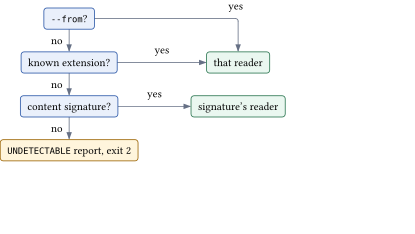
The signatures are worth knowing, because they explain behavior that otherwise looks spooky.
PK\x03\x04opens a ZIP. The specific format comes from part names that are visible in the central directory without extracting anything.word/document.xmlmeans DOCX.xl/workbook.binmeans XLSB, and it is checked beforexl/workbook.xml, which means XLSX.ppt/presentation.xmlmeans PPTX. An OpenDocument or EPUB file declares itself in itsmimetypeentry:application/vnd.oasis.opendocument.spreadsheetis ODS, andapplication/epub+zipis EPUB.\xd0\xcf\x11\xe0\xa1\xb1\x1a\xe1opens a legacy Compound File. Its directory names its streams in UTF-16LE.WordDocumentmeans.doc.WorkbookorBookmeans.xls.PowerPoint Documentmeans.ppt.%PDFis a PDF.{\rtfis RTF.
So consider the renamed slides.zip. The extension matches no reader. The sniff finds ppt/presentation.xml. The PPTX reader converts it as if nothing happened. The name was wrong; the bytes were not.
The road a document travels#
Every conversion in this book, every format, every chapter, makes the same seven stops:

The reader parses one format and emits nodes, attaching typed facets for what Markdown alone cannot hold. The tree is the single representation of Part II. The validator proves structural invariants before anything else may touch the tree, and proves them again after every filter stage. Filters are Zig transforms compiled into your binary (Chapter 7). The lowering plan records and prices every degradation the writer declares, which is where the graded --strict refusal happens. The writer renders Markdown deterministically. Commit publishes the artifact, then any extracted media, then the manifest. Each rename is atomic; the manifest appears last and certifies the complete ensemble. Nothing in the middle knows what format the bytes came from. That ignorance is enforced at compile time, and it is the subject of Chapter 3.
Exercise 1.1.
Convert any office document you have with--reports json and find the stable code of each report. Then convert it again and diff both the artifact and the manifest. What changed?Hint: Nothing should change. Determinism is a stated contract of the writer and the manifest encoder.
Exercise 1.2.
Createnotes.md with some content. Then run a conversion whose output path collides with it, without --overwrite. What exit code do you get, and what does the report tell you to do? Verify that notes.md was not touched.Hint: Refusals happen before the rename. The temporary file is discarded.
Exercise 1.3.
Take a.xlsx file, strip its extension (cp sheet.xlsx mystery), and convert it. Which of the three detection stages fired? How would you prove it from the manifest alone?Hint: The manifest’s source.format records the decision.