Getting Started
Odin is dead-simple to get started with!
There are 3 main ways of getting Odin:
- Official Releases - for downloading the latest monthly or nightly release
- From Source - for building from source (very easy to do)
- Package Managers - for an overview of package managers that package Odin
The compiler currently supports compiling on:
- Windows x86-64/AMD64 (MSVC)
- Linux x86-64/AMD64 and ARM64
- MacOS x86-64/AMD64 and ARM64
- FreeBSD x86-64/AMD64 and ARM64
- NetBSD x86-64/AMD64 and ARM64
- OpenBSD x86-64/AMD64
and supports compiling to many more targets.
Official Releases
Download the latest monthly or nightly release and look over the release requirements below.
Latest Release Latest Nightly Builds
Release requirements / notes
Windows:
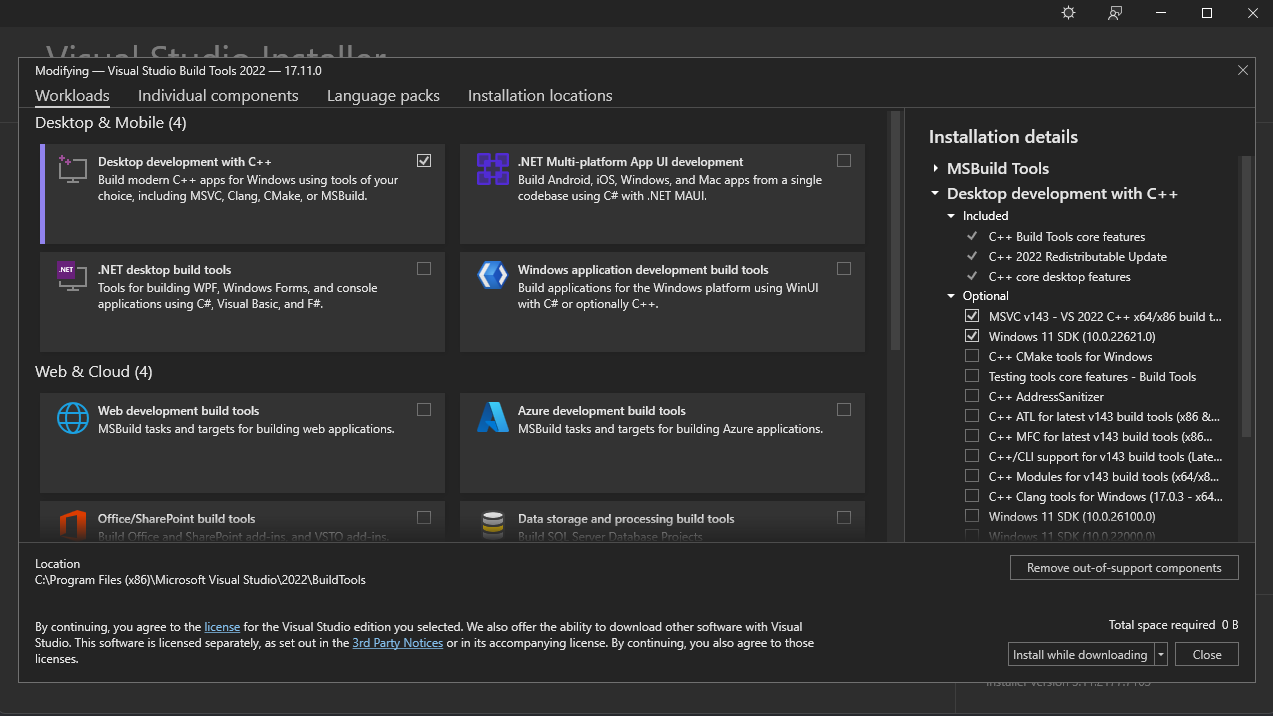
- Odin needs the MSVC compiler and windows SDK from the "Desktop development with C++" component.
If you don't have this already, you can download the installer here.
Make sure to at least click on "Desktop development with C++" and tick the boxes for MSVC and the Windows SDK.
It should look something like:
- If you want the smallest install possible, there is a third-party script that installs only the things that are needed
- Optionally add the Odin compiler directory to the PATH environment variable so
odin.exeis accessible everywhere on your computer
MacOS:
- Install XCode command-line tools
xcode-select --install- If that command is not found you may need to install XCode from the App Store
- Note that this release does not come with
wasm-ldfor compiling to WASM, you have to install that separately as described in the chapter about building from source - Optionally add the Odin folder to your shell's path or symlink the
odinbinary to a folder that is in your shell's path- Example for ZSH (from the Odin folder):
echo 'export PATH="/path/to/Odin/folder:$PATH"' >> ~/.zshrc - Note that the compiler executable expects to be next to/in the same folder as the
base,core, andvendorfolders, you can however set theODIN_ROOTenvironment variable to override the path to these folders
- Example for ZSH (from the Odin folder):
- If macOS complains that it can't verify the executable, it might be quarantined because it's unsigned. To unquarantine, try
xattr -d com.apple.quarantine <path_to_odin_executable>
Others (Unix):
- Install Clang which is used for linking (see your package manager's instructions)
- Debian/Ubuntu -
apt install clang - Fedora -
dnf install clang
- Debian/Ubuntu -
- Optionally add the Odin folder to your shell's path or symlink the
odinbinary to a folder that is in your shell's path- Example for bash (from the Odin folder):
echo 'export PATH="/path/to/Odin/folder:$PATH"' >> ~/.bashrc - Note that the compiler executable expects to be next to/in the same folder as the
base,core, andvendorfolders, you can however set theODIN_ROOTenvironment variable to override the path to these folders
- Example for bash (from the Odin folder):
Package Managers
Repology maintains a list of package managers and their status.
Note that these packages are configured by third-parties and may be flawed, please direct support to their maintainers.

From Source
Windows
- Odin needs the MSVC compiler and windows SDK from the "Desktop development with C++" component.
If you don't have this already, you can download the installer here.
Make sure to at least click on "Desktop development with C++" and tick the boxes for MSVC and the Windows SDK.
It should look something like:
- If you want the smallest install possible, there is a third-party script that installs only the things that are needed
- Your command prompt will probably not have the Microsoft Build Tools set up by default, there are 2 ways to set it up if it isn't:
- run the
x64 Native Tools Command Prompt for VS20xxshortcut bundled with Visual Studio (search in start menu), or - run
vcvarsall.bat x64from a blankcmdsession
- run the
- Clone the repository somewhere:
git clone https://github.com/odin-lang/Odin - Navigate to the Odin folder:
cd Odin - Optionally use
git checkout dev-YYYY-MMto checkout one of the official releases - Run
git lfs install(once, to install git hooks) and optionallygit lfs pullto set up Git LFS and fetch the files stored there. - Run
build.bat release - Optionally add the Odin compiler directory to the PATH environment variable so
odin.exeis accessible everywhere on your computer
Updating
- Through step 2 of installing, open up the developer command prompt
- Navigate to the Odin folder
- Optionally use
git checkout dev-YYYY-MMto checkout an official release git pull- If the git hooks didn't update files stored in Git LFS, use
git lfs pull build.bat release
MacOS
- Install XCode command-line tools
xcode-select --install- If that command is not found you may need to install XCode from the App Store
- Install Homebrew and then LLVM:
brew install llvm, the versions we support are 17, 18, 19, 20, 21, and 22 - Clone the repository somewhere:
git clone https://github.com/odin-lang/Odin - Navigate to the Odin folder:
cd Odin - Optionally use
git checkout dev-YYYY-MMto checkout an official release - Run
git lfs install(once, to install git hooks) and optionallygit lfs pullto set up Git LFS and fetch the files stored there. - Run
make release-native- If you want to specify an explicit LLVM version or path, you can set the
LLVM_CONFIGenvironment variable:LLVM_CONFIG=/path/to/llvm-config make release-native
- If you want to specify an explicit LLVM version or path, you can set the
- Optionally add the Odin folder to your shell's path or symlink the
odinbinary to a folder that is in your shell's path- Example for ZSH (from the Odin folder):
echo 'export PATH="/path/to/Odin/folder:$PATH"' >> ~/.zshrc - Note that the compiler executable expects to be next to/in the same folder as the
base,core, andvendorfolders, you can however set theODIN_ROOTenvironment variable to override this
- Example for ZSH (from the Odin folder):
A note on WASM and LLVM binaries
In order to compile for WASM, Odin calls out to wasm-ld for linking.
This linker is included in the lld formula, install it through brew install lld.
Updating
- Navigate to the Odin folder
- Optionally use
git checkout dev-YYYY-MMto checkout an official release git pull- If the git hooks didn't update files stored in Git LFS, use
git lfs pull make release-native
Others (Unix)
- Install clang and LLVM (the versions we support are 17, 18, 19, 20, 21, and 22) using your package manager
- It could be that LLVM is split into multiple packages and you also need to install something like
llvm-devel - If you are using an older (or Enterprise) release, the distro may not offer a sufficiently current and complete version of LLVM by default
- On a Debian-based distro, we recommend using https://apt.llvm.org to install LLVM 22
- On a RedHat-based distro, we suggest COPR, e.g.
dnf copr enable fedora-llvm-team/llvm-snapshots
- It could be that LLVM is split into multiple packages and you also need to install something like
- Make sure
llvm-config,llvm-config-(17|18|19|20|21|22), orllvm-config(17|18|19|20|21|22)andclangare able to be found through your$PATH- If you want to specify an explicit LLVM version or path, you can set the
LLVM_CONFIGenvironment variable:LLVM_CONFIG=/path/to/llvm-config make release-native
- If you want to specify an explicit LLVM version or path, you can set the
- Clone the repository somewhere:
git clone https://github.com/odin-lang/Odin - Navigate to the Odin folder:
cd Odin - Optionally use
git checkout dev-YYYY-MMto checkout an official release - Run
git lfs install(once, to install git hooks) and optionallygit lfs pullto set up Git LFS and fetch the files stored there. - Run
make release-native- If an atomic.h error occurs, see the following section about it
- Optionally add the Odin folder to your shell's path or symlink the
odinbinary to a folder that is in your shell's path- Example for bash (from the Odin folder):
echo 'export PATH="/path/to/Odin/folder:$PATH"' >> ~/.bashrc - Note that the compiler executable expects to be next to/in the same folder as the
base,core, andvendorfolders, you can however set theODIN_ROOTenvironment variable to override this
- Example for bash (from the Odin folder):
A note on atomic.h
The Odin compiler relies on C++'s atomic.h for atomic memory ordering, some operating systems need some more steps to install this.
To find out which package you need to install, use clang++ -v and look for "Selected GCC installation" and note the version number (usually 12, or 14).
Then, depending on OS, install the corresponding c++ standard package, usually called libstdc++-VERSION-dev but also found under different names,
for help and more information see this GitHub issue.
Updating
- Navigate to the Odin folder
- Optionally use
git checkout dev-YYYY-MMto checkout an official release git pull- Run
git lfs installand optionallygit lfs pullto set up Git LFS and fetch the files stored there. - If the git hooks didn't update files stored in Git LFS, use
git lfs pull make release-native
Got stuck?
If something did not work as said on this page or you just need help, do not hesitate to reach out through our Discord or Github issues/discussions.
Do note that we do not officially maintain or support the various package managers.
What Next?
Why not check out the Odin Overview for more information on the Odin Programming Language!