
A report, a book, and a visual identity
A measurement is only useful after someone can read it. CCM’s interface therefore treats presentation as an explanation of the bundle rather than a second analysis engine. The same inventory, finite model, and economic inputs can produce a short terminal view, an expert view, a standalone report, or a machine record. Their different levels of detail should not produce different quantities.
The terminal report leads with the number most readers want, program lines, and then lists the languages grouped by purpose, each group with a subtotal.
Its labels and fill patterns carry the meaning in monochrome; one accent color, bold, and dim text only reinforce the hierarchy, and yellow or red appear only for warnings and failures.
The estimate is drawn as a stacked bar with one pattern per component, a legend with amounts and shares, and the calibration range.
A change is drawn as a flow from changed files to affected parts to checks.
--format plain, or a locale that is not UTF-8, gives the same report in ASCII.
The compact view omits zero optional activities and points to the assumptions; --verbose lists every item, and --technical adds the full derivation.
This balance lets a planning reader find the result without losing the expert’s audit trail.
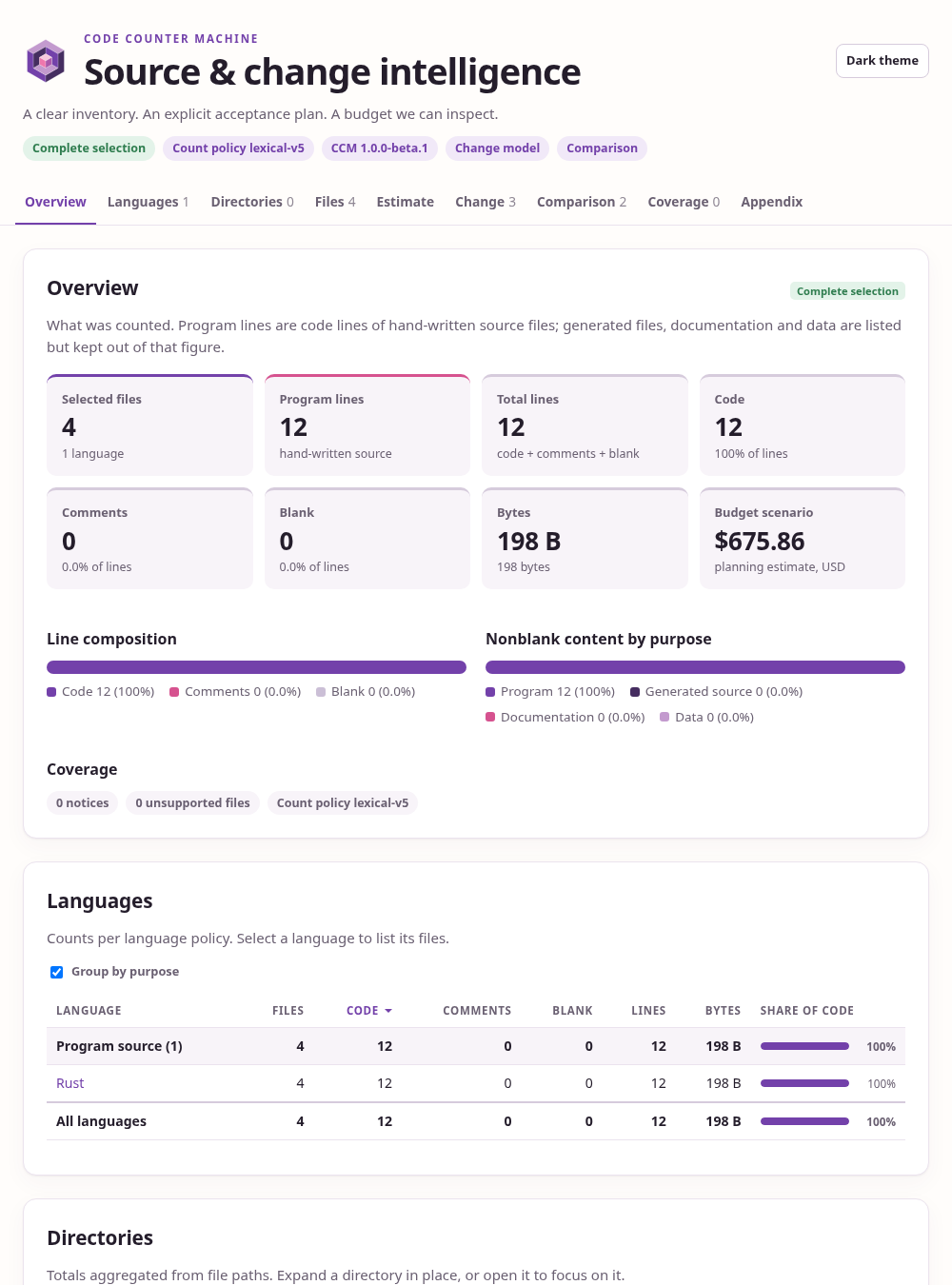
The HTML report is one self-contained file that the ccm binary writes with all of its styles, scripts, and logo embedded.
It needs no network and no companion files.
Without scripts it shows a static summary; with scripts it lets a reader drill down from languages and directories to single files, and from the estimate and the acceptance plan to each formula, artifact, and check.
One logo, several media
The mark is an abstract solid generated by the Rust tool ccm-art.
It is an isometric cube whose near corner is cut away, with a small pink cube in the inner corner of the cut.
Seen along the cube diagonal it reads as three nested hexagons: the outer ring, the hollow notch, and the change at the center.
The solid stands for a system, the notch for the region a change affects, and the pink cube for the change itself.
Every polygon follows from a few named sizes and the standard isometric projection, and one light direction shades the faces.
A monochrome variant uses tints of a single ink.
The same canonical SVG is embedded in standalone reports and staged into the book and website. We do not maintain an unrelated hand-edited mark for each surface. Regenerating the asset therefore changes the visible identity through one reviewed source tool. The tool uses the standard library’s formatting and filesystem support, with no external Rust SVG crate.
The book cover tells the same story at a larger scale. It draws a nine-by-nine isometric lattice of modules. One pink module changes, and the modules it reaches through dependency edges rise and fade with their distance from it. A tinted floor region marks the bounded closure, the part of the system that the change can affect. The custom Typst template draws the lattice with CeTZ 0.3.4, and a fixed integer hash chooses the edges, so every build draws the same picture.
The publication pipeline
guidedog ssg build docs --out docs/_build/site
guidedog build pdf docs/book
When we edit generated artwork or the executable screenshots, we refresh those inputs and ask the same installed Guidedog CLI to assemble the result.
cargo xtask assets
cargo xtask docs
cargo xtask docs --no-pdf
The complete task regenerates vector assets, renders the cover preview, stages shared files, builds CCM, captures live report screenshots, and asks Guidedog to assemble the landing page, HTML book, PDF book, and design-record catalog.
The build invokes the installed guidedog executable on PATH; --guidedog PATH selects another installed executable.
Guidedog generates the PDF through its normal compiler support; the book configuration does not override it with an external executable.
The separate Typst CLI is needed only for SVG artwork and PNG previews, while a headless Chrome, Chromium, or Edge captures the report screenshots.
The screenshots are committed; without a browser the task keeps them and finishes the build.
cargo xtask assets checks for the Typst CLI first and reports an Elm-style error with an installation hint if it is missing.
We can still build the book through Guidedog from the prepared assets.
These are publication tools, not dependencies invoked by ordinary measurement.
The landing page introduces the same three questions as the book: what is present, what a declared change affects, and what evidence or resources remain necessary. It links directly to the HTML book, downloadable PDF, examples, and design records. The assembled site is a local artifact until we deliberately publish it.
Screenshots as observations
The CLI screenshots begin with actual ANSI output from the executable. A small renderer displays that transcript in the book’s terminal palette, and a headless browser captures the result. The report screenshot begins with CCM’s own HTML output for the same fixture. Neither image is a manually invented table. The generated JSON beside them makes the quantities independently inspectable.
The fixture and its source model keep screenshots from becoming ornamental examples that no longer match the software. We can regenerate them after a CLI change, inspect overflow and contrast, and compare the underlying numeric result. A useful screenshot is another reproducible view of a measurement.
The last design rule
A beautiful interface does not need an unexplained score. It needs hierarchy, readable names, stable units, and a visible route to detail. The prose, diagrams, and artwork in this book follow the same rule as the executable: a claim should have a place where its inputs and limits can be found.